
On this page
Government contractors often juggle bid feeds, spreadsheets, SharePoint libraries, and separate proposal tools. GovSignals aims to consolidate these into a single system that finds opportunities, manages the pipeline, and drafts proposal content.
The product targets U.S. GovCon teams, ranging from small contractors to larger defense-oriented firms, as well as public-sector procurement and acquisition teams. The strongest evidence relates to federal, state, and local opportunity discovery combined with proposal automation. The main concern is not whether the platform has features – it does – but how well the vendor’s claims about scale and accuracy hold up in your specific market and workflow.
GovSignals claims to work across federal, state, and local data, pulling from over 1,000 government portals and using a dataset that includes more than 50 million documents and 300,000 contract records. These are significant claims for teams that spend too much time searching, triaging, and rewriting the same proposal artifacts.
Quick Verdict
GovSignals is most compelling for GovCon teams seeking a single system for both opportunity capture and proposal production, not just another bid database. It stands out more for its workflow breadth than for any single killer feature, so the demo must demonstrate data precision, source traceability, and proposal output quality.
- Best for: Government contractors that want capture, pipeline, and proposal work in one platform
- Not ideal for: Teams that only need basic bid tracking without proposal automation
- Biggest strength: Capture-to-proposal workflow in a single product
- Biggest risk to verify: Whether matching accuracy and proposal automation hold up on your actual opportunities
What Is GovSignals?
GovSignals is an AI-driven government contracting platform focused on U.S. public-sector work. It operates between a bid intelligence database, a lightweight opportunity management layer, and a proposal drafting system. Therefore, it should not be considered just a search tool, nor should it be viewed as a full general-purpose CRM replacement unless the demo demonstrates that suitability.
The core workflow begins with opportunity discovery and matching, progresses to list and pipeline management, and then covers compliance outlines, proposal drafting, and red-team style evaluation. For teams currently running capture and proposal operations in separate systems, this unified approach is the product’s clearest advantage.
Company details are straightforward: GovSignals was founded in 2023 and lists Washington, DC, US as its headquarters. Team size is listed as 11–50 employees. The company also announced a $5.5 million seed round in September 2024.
Named customers include Loft Federal, Ad Hoc, and Savvee, with Mediko also featured in case studies. These references indicate relevance for federal contractors, digital services firms, and healthcare-related government vendors, rather than a narrow niche buyer.
Key Features
Opportunity Matching and Discovery
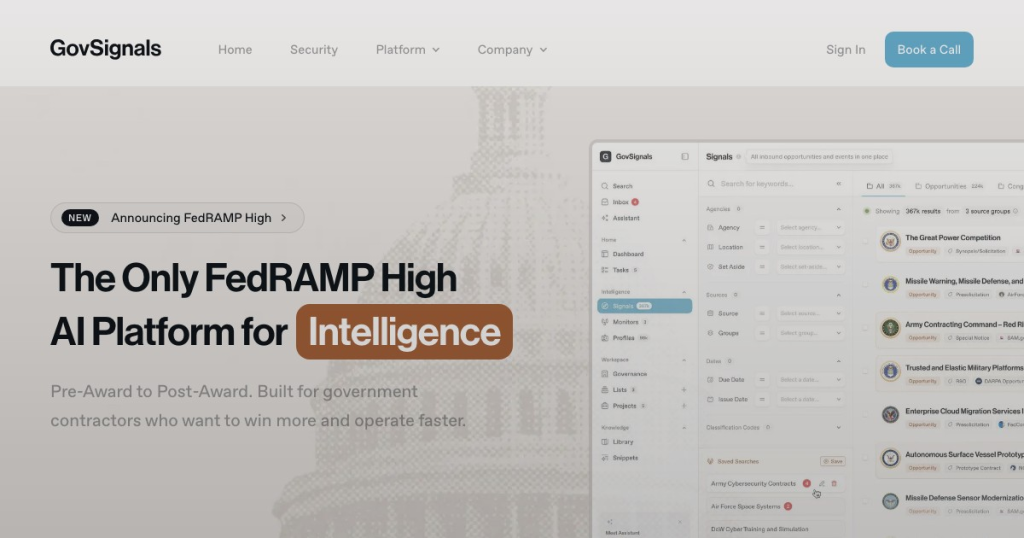
GovSignals recommends government funding and contract opportunities tailored to a company’s profile, with recommendations updated daily. This is positioned at the top of the capture workflow, where teams need to reduce manual searching across solicitations, awards, legislative documents, and budget-related sources.
Pipeline Lists for Bid Management
The platform features dynamic lists that move opportunities from discovery to pursuit management. While this is standard for modern capture software, it is important here because GovSignals presents these lists as the link between signal discovery and proposal execution, rather than as a separate CRM project.
Compliance Outlines and Matrix Creation
For proposal teams, GovSignals can generate outlines and compliance matrices from RFP requirements. This is a concrete time-saving feature because compliance extraction is repetitive, high-stakes work, and mistakes can create downstream rewrite cycles. The vendor cites more than 95% accuracy, which is a useful claim only if your team can test it on live solicitations.
Proposal Drafting and Evaluation
Beyond outlining, the system drafts proposal sections using company data and RFP requirements, then provides built-in evaluation and red-team analysis. This makes GovSignals more of a production proposal workspace than a pure capture tool. The practical question is whether the drafts are editable, compliant, and specific enough to reduce reviewer effort rather than create more cleanup.
Government Data Aggregation
GovSignals states that it covers U.S. federal, state, and local government data, including legislative and regulatory documents, solicitations, awards, and proprietary feeds. The company reports over 50 million documents, more than 300,000 contract records, and daily updates. If these numbers result in usable signal quality for your agencies and NAICS codes, the platform could eliminate much of the manual source monitoring.
Security for Sensitive Proposal Work
Security is a key aspect of the pitch, especially for defense-oriented use cases. GovSignals publicly references FedRAMP High, CMMC 2.0 compliance, SOC 2 for higher tiers, and a DoD IL5 environment. These are not minor details for contractors handling controlled data; they require direct confirmation during procurement.
Pros
- Capture-to-proposal workflow
- Daily opportunity matching
- 50M+ document dataset
- Proposal compliance automation
- FedRAMP High environment
- Case-study ROI signals
Cons
- Short operating history
- Coverage numbers conflict
- 95% accuracy claim unproven
- CRM details not documented
- May exceed simple needs
Buying Checks
Most of the buying risk lies in proof, not in feature availability. GovSignals makes many ambitious claims about coverage, automation, and security. A thorough evaluation should turn these claims into concrete tests.
- Run a live search for your named agencies, contract vehicles, and NAICS codes to confirm federal, state, or local coverage where you actually sell.
- Spot-check several opportunities against their source documents and dates to confirm whether daily refreshes are visible in the product.
- Upload a recent RFP and inspect the compliance matrix line by line instead of accepting the 95% accuracy claim at face value.
- Generate a draft section from your own past performance or knowledge base content and see how much manual rewriting the team still has to do.
- Ask the vendor to show what counts as a data source, because public materials mention both 1k+ government portals and 100k+ verified sources.
- Test CRM integration on an actual export or sync workflow, including field mapping, duplicate handling, and list updates.
- Verify which security credentials apply to your edition and deployment, including FedRAMP High, DoD IL5, SOC 2, and CMMC 2.0 claims.
Who Is GovSignals Best For?
Best fit: Government contractors managing both capture and proposal operations, especially teams seeking to connect opportunity discovery with compliance review and draft generation. The case studies featuring Loft Federal, Savvee, and Mediko support this use case more than a narrow bid-search-only approach.
Possible fit: Public-sector acquisition or procurement teams that need centralized proposal intelligence and document retrieval. Ad Hoc’s case study on proposal knowledge management suggests this, though the public evidence remains stronger on the contractor side.
Not ideal for: Small teams that only need a straightforward bid feed and basic tracking. GovSignals acknowledges it is a broad, feature-heavy platform, which can be unnecessary overhead if proposal automation and knowledge management are not part of the purchasing goal.
Best Alternatives to GovSignals
Deltek GovWin IQ is a better fit for teams seeking an established government contracting intelligence product and who do not need built-in AI proposal drafting. It is more similar to a traditional market intelligence and opportunity tracking tool.
GovTribe is more suitable if the priority is federal bid intelligence and opportunity visibility rather than a complete capture and proposal workflow. It is more adjacent than identical, as GovSignals extends further into content generation.
CivicIQ: Worth considering for SLED-focused teams interested in pre-RFP signals and planning-stage visibility. This is a more direct option if your purchasing process begins before formal solicitations, but it lacks GovSignals’ proposal automation feature.
GovSpend (Fedmine): Better suited for buyers focused on federal spending and award intelligence. It is adjacent rather than direct because the emphasis is on award data, not a unified proposal production workflow.
Final Verdict
GovSignals is easiest to justify when your team needs to connect three tasks that are usually handled in different tools: finding the right opportunities, deciding whether to pursue them, and quickly building the first compliant draft. That integrated model is the reason to consider it.
Shortlist it if your capture and proposal teams are losing time to manual source monitoring, repetitive compliance setup, and scattered proposal knowledge. Keep looking if you only need a simple federal bid tracker or if your process already has a proposal stack that works well enough.
The buying lens here is specific: don’t just ask whether GovSignals finds opportunities. Make it prove that the same opportunity can move smoothly from match to source-backed review, to compliance outline, to draft content without introducing unnecessary cleanup. If that chain holds up in your demo, GovSignals has a real case. If it doesn’t, the breadth becomes extra surface area rather than an advantage.