
Beautiful.ai logo

Beautiful.ai

Beautiful.ai combines AI-assisted presentation creation, responsive layouts, brand controls, collaboration, and editable exports on paid plans.

Editorial score

4.0 /5
How we scored it

Is Beautiful.ai worth it?

Nick Oscar
Editor, Reviews.vc · Updated September 18, 2026
Good For

AI creation can begin with prompts, outlines, documents, PDFs, and links, with outline editing before visual generation.

Caution

Google Slides exports lose embedded video, audio, animations, and transitions.

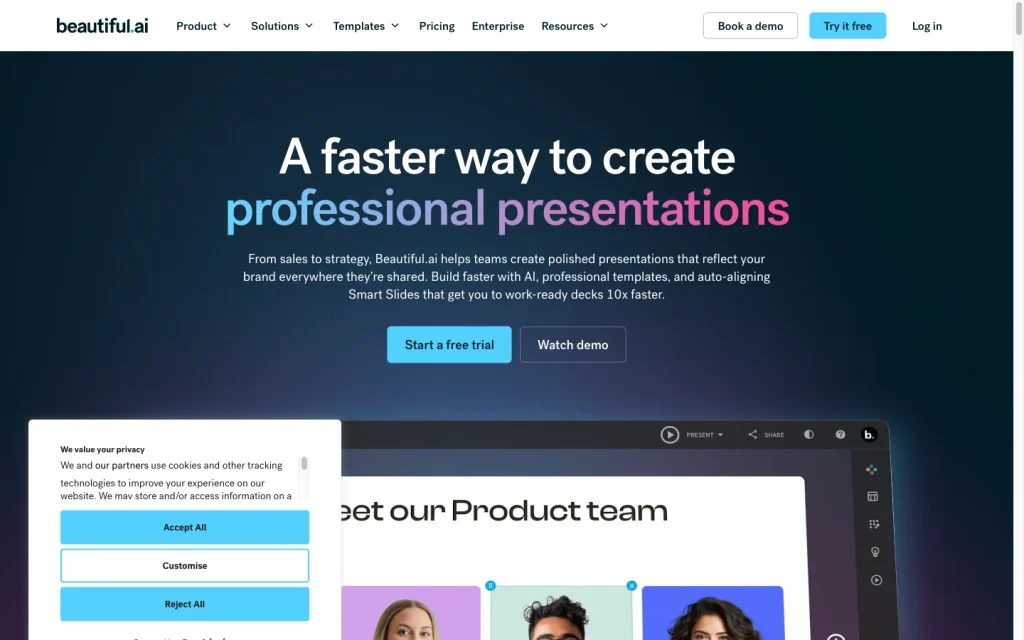
Beautiful.ai product image
beautiful.ai
On this page

Beautiful.ai is a browser-based presentation platform built around AI-assisted creation and responsive Smart Slides. It offers a strong set of brand, collaboration, sharing, analytics, and paid export features, with Classic Slides available for work that needs more hands-on layout control.

What is Beautiful.ai?

Beautiful.ai is a browser-based presentation platform for creating, publishing, sharing, and presenting slide decks. Its Smart Slides automatically align, resize, and animate content, while AI-assisted workflows, templates, brand controls, collaboration tools, analytics, and export options support the broader presentation lifecycle.

Presentation creation

Create with AI can start from typed, pasted, or dictated prompts, attached documents, PDFs, links, and detailed instructions. It produces a slide-by-slide outline that can be edited, reordered, trimmed, or expanded before visual generation. Slide AI can then regenerate, restructure, restyle, or change images on individual slides without affecting the rest of the deck.

Design and brand control

Smart Slides provide responsive layout guardrails, with more than 300 pre-built layouts available. For work that needs greater freedom, Classic Slides allow free positioning and editing of elements. Brand Kits centralize fonts, logos, colors, and iconography; shared kits can be locked and can update presentations using the kit in real time.

Delivery and collaboration

Teams can collaborate in shared workspaces and use permissions, comments, version history, secure sharing, and viewer analytics. Paid plans export editable PowerPoint and Google Slides files, plus PDFs, PowerPoint images, print output, and an Offline Player package. Google Slides exports lose embedded video, audio, animations, and transitions; PowerPoint output can show font-related formatting differences.

Who should consider Beautiful.ai?

Beautiful.ai is ideal for individuals and non-designers who want polished decks with less manual layout work, as well as consultants and agencies building reusable, client-ready materials. It also suits teams that need shared templates, approved assets, collaboration, and brand consistency for sales and marketing pitches, consulting deliverables, roadmaps, strategy decks, and training content.

Buyer scenarios

Where the product fits — and where to be careful

Non-designers and client-facing professionals

Need
Create polished sales, marketing, consulting, strategy, or training decks without extensive manual layout work.
Why it fits
Smart Slides, templates, AI-assisted creation, and centralized Brand Kits reduce manual formatting while preserving a controlled look.
Watch out
Automated layouts favor guardrails; use Classic Slides when a layout needs free positioning and more direct editing.

Strong fit

Brand-governed teams

Need
Keep recurring presentations on brand while sharing assets and coordinating work across a team.
Why it fits
Shared workspaces, collaboration, permissions, shared assets, templates, and locked Brand Kits support governed team presentation work.
Watch out
Editable PowerPoint and Google Slides exports are available on paid plans, but external exports can lose media or show formatting differences.

Strong fit for in-platform collaboration

Pros & Cons

Pros

  • AI creation can begin with prompts, outlines, documents, PDFs, and links, with outline editing before visual generation.
  • Smart Slides automate alignment, resizing, and animation, while Classic Slides provide a more freely editable canvas.
  • Brand Kits, shared assets, templates, permissions, and collaboration features suit governed team workflows.
  • Paid plans offer editable PowerPoint and Google Slides export alongside PDF, image, print, and Offline Player options.

Cons

  • Google Slides exports lose embedded video, audio, animations, and transitions.
  • PowerPoint output can show font-related formatting differences.
  • Secured viewers must have and verify a Beautiful.ai account.
Editorial score breakdown

Editorial scores

Editorial score
4.0
Delivery and collaboration
4.0

Paid plans provide editable PowerPoint and Google Slides exports, while teams also get permissions, comments, sharing, and analytics. Export fidelity has clear limits for some media and fonts.

Design and brand control
4.0

Responsive Smart Slides provide layout guardrails, Classic Slides add free-positioning controls, and Brand Kits centralize and can lock shared visual rules.

Presentation creation
4.0

AI creation accepts prompts, outlines, documents, PDFs, and links, supports outline editing before design, and offers slide-level regeneration, restructuring, and restyling.

Usability, support & value Not scored

User-review evidence was insufficient to score usability, support, and value.

Pricing and contract model

Beautiful.ai offers a one-off presentation option plus Pro, Team, and Enterprise plans. Pro and Team include a 14-day trial that requires a credit card and renews unless canceled before the trial ends.

PlanPriceIncludes
Single presentation
$45
one time
One-off single-presentation option.
Pro
$12 per month
annual billing
One member; billed annually. Includes unlimited slides and unlimited AI content generation.
Pro
$25 per month
monthly billing
One member.
Team
$40 per user per month
annual billing
For 2–20 users; billed annually.
Team
$50 per user per month
monthly billing
For 2–20 users.
  • Pro and Team trials last 14 days and require a credit card.

Integrations

Documented connections and access methods for Beautiful.ai.

Messaging & collaboration

Slack Native

Developer/API

Beautiful.ai API Public API

Productivity suite

Microsoft PowerPoint Native

Document storage

Google Drive Native
Dropbox Native
Box Native
OneDrive Native

Data import/export

Smartsheet Native
Airtable Native

Other

Claude Embedded
ChatGPT Embedded
Bynder Native
Frontify Native

What's new

Recent product and company updates

  • 2025-12-15

    Create with AI release

    Beautiful.ai 3.0 introduced Create with AI changes including AI-generated custom slides, improved text editing, and AI-generated images.

    Source
  • 2026-03-18

    Context-aware workflow and $45 million investment

    Beautiful.ai announced a context-aware AI workflow, localization in 15 languages, a new API, a ChatGPT app, a more mobile-friendly experience, and a $45 million General Catalyst investment.

    Source

FAQ

How much does Beautiful.ai cost?
Pro costs $12 per month billed annually or $25 monthly for one member. Team costs $40 per user per month annually or $50 monthly, while Enterprise pricing is custom.
What can Beautiful.ai use to create a presentation with AI?
Create with AI accepts typed or pasted prompts, dictated prompts, attached documents, PDFs, links, and detailed slide-by-slide instructions. It creates an editable outline before visual generation.
Can Beautiful.ai export to PowerPoint and Google Slides?
Pro, Team, and Enterprise support editable PowerPoint and Google Slides export. Google Slides exports lose embedded videos, audio, animations, and transitions, and PowerPoint output can show font-related formatting differences.
How does Beautiful.ai handle brand consistency?
Brand Kits centralize fonts, logos, colors, and iconography. Shared kits can be locked, and changes can update presentations using the kit in real time.
Review transparency Corrections policy
Change history
  1. 2026-09-18 Initial publication First published version of this review.
24 sources analyzed
  1. Presentation Software beautiful.ai
  2. Creating a presentation with AI support.beautiful.ai
  3. Create and Edit your Slides with Slide AI support.beautiful.ai
  4. Brand Kit Overview support.beautiful.ai
  5. Exporting your slides and presentations support.beautiful.ai
  6. Pricing Plans beautiful.ai
  7. Integrations beautiful.ai
  8. Product Updates beautiful.ai
  9. Beautiful.ai launches context-aware AI workflow and secures $45M investment beautiful.ai
  10. Understanding Classic Slides support.beautiful.ai

Showing 10 of 24 sources · 14 additional sources analyzed

Feedback on this article

Was this review helpful?

Private editorial feedback. It does not change product ratings or rankings.

Rate Beautiful.ai

Rate your experience
  • Delivery and collaboration
  • Design and brand control
  • Presentation creation
  • Usability, support & value