
Plus AI logo

Plus AI

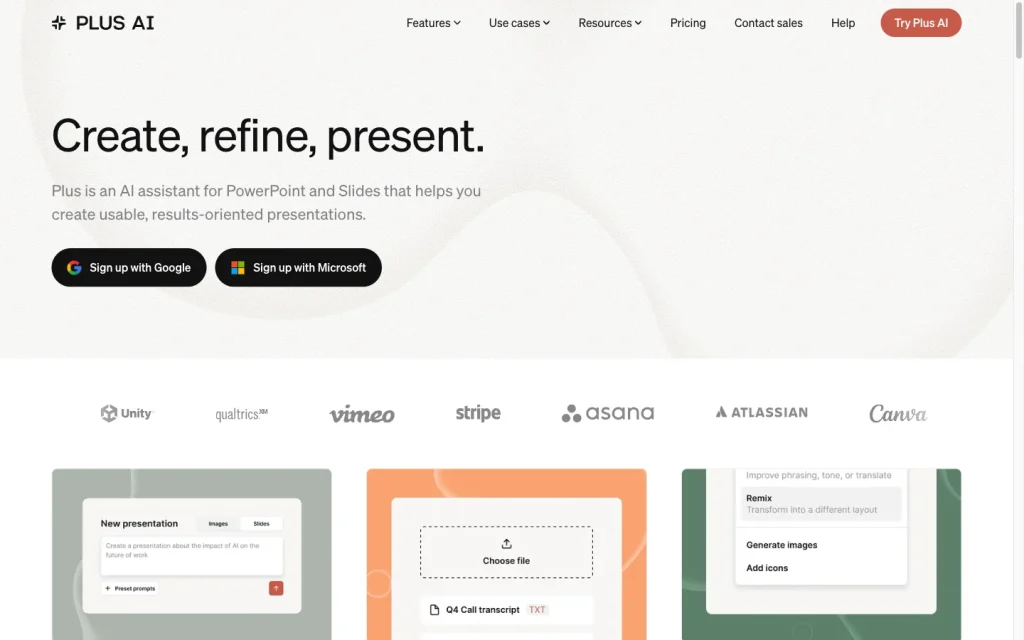
Plus AI creates and edits presentations within PowerPoint and Google Slides, with strong generation options and notable template constraints.

Editorial score

3.5 /5
How we scored it

Is Plus AI worth it?

Nick Oscar
Editor, Reviews.vc · Updated September 18, 2026
Good For

Works inside Google Slides and Microsoft PowerPoint rather than requiring a separate editor.

Caution

Uploaded files do not have images, diagrams, or charts extracted for generation.

Plus AI product image
plusai.com
On this page

Plus AI is a presentation add-on for teams that work in PowerPoint or Google Slides. Its breadth is a clear strength: it can generate from prompts and files, revise existing decks, create native PPTX output, and add team branding or automation. The trade-off is a set of template and import limitations, while the available user-review aggregate is uniformly negative on value, generation, and support.

What is Plus AI?

Plus AI is an AI presentation creation and editing add-on that works inside Microsoft PowerPoint and Google Slides. It can build decks from prompts, pasted or uploaded material, and slide-by-slide specifications, then revise slides with Insert, Rewrite, and Remix tools.

Creation workflow

Creation options span prompt-to-deck, document-to-deck, single-slide, slide-by-slide, and existing-deck remixing. Prompt generation presents an editable outline before slides are made and supports about 20 slides per generation. Document workflows accept PDF, Word, text, and presentation files, while Remix can handle individual slides, batches of up to 30 slides, and uploaded decks.

There are practical input limits. Slide-by-slide generation allows up to 5,000 characters per slide, and uploaded files do not yield extracted images, diagrams, or charts. Upload-based generation and remixing are limited to about 30 slides.

Design and brand control

Plus AI offers layouts and templates for generation, insertion, and remixing, alongside rewrite controls for phrasing, audience, tone, length, and translation. Pro and Team plans include AI image generation with style options, and Team branding supports shared colors, fonts, and logos.

Its branding model has notable limitations. Standard Plus templates do not work with custom branding. Custom-template import is a Google Slides-only Team beta, with a five-template limit, up to 25 slides per template, and some complex elements potentially static or unsupported.

Delivery and collaboration

Generated work remains editable in its host application. Plus AI creates native PPTX files through its Open XML renderer, and Google Slides presentations can be edited, shared, and exported as regular slides. Team and Max add shared team resources, while Enterprise adds governance features including SSO and user management.

The Presentation Agent does not run directly in Google Slides, although its native PPTX files can be uploaded there. Cross-format round-trip fidelity is not guaranteed.

Who should consider Plus AI?

Plus AI is best suited to professionals who already build presentations in PowerPoint or Google Slides and want assistance without switching presentation environments. Basic targets individual presentation work; Pro adds uploads, longer prompts, and AI images; Team adds shared brand settings; and Enterprise targets governed workflows.

It is less suited to teams that need fully unrestricted custom-template handling or automatic extraction of visual source material. AI output provides drafting and revision assistance, so the user remains responsible for reviewing the finished presentation.

Buyer scenarios

Where the product fits — and where to be careful

Teams already working in PowerPoint or Google Slides

Need
Create or revise presentations within an existing PowerPoint or Google Slides workflow.
Why it fits
It stays inside the two mainstream presentation tools, supports prompt and file-based generation, and produces editable slides.
Watch out
Upload-based workflows do not extract images, diagrams, or charts from source files; users must review output before using it as final material.

Strong fit for people who want AI-assisted deck creation without adopting a separate presentation editor.

Brand-conscious teams

Need
Generate on-brand presentations with shared team controls.
Why it fits
Team adds shared branding, templates, presets, and custom instructions; Enterprise adds SSO, user management, asset libraries, automation, and onboarding.
Watch out
Custom-template import is a Google Slides-only Team beta, limited to five templates and 25 slides per template. Standard templates and custom branding cannot be combined.

A good fit when shared settings matter and the current branding constraints are acceptable.

Pros & Cons

Pros

  • Works inside Google Slides and Microsoft PowerPoint rather than requiring a separate editor.
  • Supports prompt, document, single-slide, slide-by-slide, and remix workflows.
  • Produces editable native PPTX files and editable Google Slides presentations.
  • Includes team branding, shared presets, custom instructions, and enterprise governance options.
  • Offers a REST API plus automation and MCP workflow options.

Cons

  • Uploaded files do not have images, diagrams, or charts extracted for generation.
  • Standard templates cannot be combined with custom branding.
  • Custom-template import is a Google Slides-only Team beta with size and complexity limits.
  • Accepted user feedback is uniformly negative and centers on value, slide generation, and support.
Editorial score breakdown

Editorial scores

Editorial score
3.5
Delivery and collaboration
4.0

Plus AI delivers editable Google Slides and native PPTX output within familiar host applications, with shared team resources and enterprise governance. Cross-format round-trip fidelity is not guaranteed.

Design and brand control
4.0

Layouts, templates, rewrite controls, AI images, and shared Team branding provide strong control, though standard templates cannot pair with custom branding and custom-template import remains constrained.

Presentation creation
4.0

Plus AI supports prompt, document, slide-by-slide, single-slide, and remix workflows with editable outlines and several source formats. Input scale and visual extraction limits prevent a top score.

Usability, support & value
2.0

The accepted review aggregate contains eight negative reviews, including five value-for-money mentions and two support mentions. The sample is limited to one review source, but the available feedback is consistently negative.

Customer sentiment

Plus AI customer reviews and sentiment

Based on 8 public customer reviews. Source mix: 8 from trustpilot.com.

Customer sentiment is analyzed separately and does not determine the Reviews.vc editorial score.

8 public reviews analyzed
Positive
0%0 reviews
Mixed
0%0 reviews
Negative
100%8 reviews
Theme and findingMentionsPositiveNegative
Value for money
Reviewers report unexpected or unclear charges, difficulty cancelling, and problems obtaining refunds.
505
Slide generation
Slide creation is described as slow and unreliable, with unusable or poorly formatted output.
404
Design and brand control
Reviewers report limited personalization and inconsistent formatting or image-generation results.
202
Support
Users report unresponsive support when seeking cancellation, account access help, or refunds.
202
Integrations
The Google Slides add-on is reported to load very slowly.
101

Mentions count unique reviews. One review can count as both positive and negative for the same theme when it describes a mixed experience.

This analysis reflects public customer reviews we could identify and access at the time of collection; the displayed source mix may influence the patterns shown.

Review sentiment over time

PeriodnPositiveMixedNegative
2025 Q2Limited sample1001
2025 Q3Limited sample3003
2025 Q4Limited sample2002
2026 Q2Limited sample1001

Only periods containing dated reviews are shown; gaps between labels mean no dated reviews were available for those periods.

Pricing and contract model

Plus AI sells per-user Basic, Pro, Team, and Max plans with monthly or annual billing, plus custom Enterprise pricing. Paid plans include a seven-day trial with 1,000 AI credits; a card is required and charges automatically unless canceled.

PlanPriceIncludes
Basic
$10 per user/month annually or $15 monthly
monthly or annual
1,500 AI credits per month.
Pro
$20 per user/month annually or $25 monthly
monthly or annual
3,000 AI credits per month, document uploads, 100K+ character prompts, and AI images.
Team
$30 per user/month annually or $40 monthly
monthly or annual
6,000 AI credits per month, branding, presets, and team features.
Max
$200 per user/month annually or $240 monthly
monthly or annual
Unlimited credits and priority support.
  • Subscriptions are per-user, auto-renewing, processed through Stripe, and non-refundable. Seat and plan changes are prorated.

Integrations

Documented connections and access methods for Plus AI.

CRM

CRM and ERP workflows Other

Automation

Zapier Via automation
n8n Via automation
Make Via automation

Messaging & collaboration

Slack and Teams workflows Other

Developer/API

PowerPoint API Public API

AI protocol

MCP server Protocol

Productivity suite

Google Workspace Native
Microsoft PowerPoint Native

Data import/export

Document import Native
  • CRM, ERP, Slack, and Teams are presented as workflow categories rather than named native connectors.

What's new

Recent product and company updates

  • 2026-02-25

    Announcing the Plus AI Presentation Agent

    Plus AI announced its presentation agent.

    Source

FAQ

How much does Plus AI cost?
Basic is $10 per user per month billed annually or $15 monthly. Pro is $20 annually or $25 monthly, Team is $30 annually or $40 monthly, and Max is $200 annually or $240 monthly. Enterprise pricing is custom.
Can Plus AI turn a document into a presentation?
Yes. It accepts PDF, DOCX, PPTX, TXT, and pasted text, with document workflows offering Preserve and Enhance modes.
Can Plus AI presentations be edited and exported?
Yes. Generated presentations work as regular Google Slides or PowerPoint slides, and native PPTX files are editable. Sharing and exporting use the host application.
What branding controls does Plus AI offer?
Team branding includes shared colors, title and body fonts, and a logo. Team plans also include shared presets and team features. Standard Plus templates cannot currently be combined with custom branding.
Review transparency Corrections policy
Change history
  1. 2026-09-18 Initial publication First published version of this review.
21 sources analyzed
  1. Plus AI plusai.com
  2. Pricing plusai.com
  3. Integrations plusai.com
  4. PowerPoint API plusai.com
  5. Document to Presentation AI plusai.com
  6. Plus AI Plans and Billing guide.plusai.com
  7. Use a Prompt guide.plusai.com
  8. Custom Templates Beta guide.plusai.com
  9. Announcing the Plus AI Presentation Agent plusai.com
  10. Terms plusai.com

Showing 10 of 21 sources · 11 additional sources analyzed

Feedback on this article

Was this review helpful?

Private editorial feedback. It does not change product ratings or rankings.

Rate Plus AI

Rate your experience
  • Delivery and collaboration
  • Design and brand control
  • Presentation creation
  • Usability, support & value