
Cartesia logo

Cartesia

Cartesia is a developer-focused AI voice platform with multilingual TTS, cloning, speech controls, streaming APIs, and telephony-ready audio.

Editorial score

4.0 /5
How we scored it

Is Cartesia worth it?

Nick Oscar
Editor, Reviews.vc · Updated September 18, 2026
Good For

Strong multilingual Sonic 3.6 coverage, with 44 languages and 61 locales listed in its release announcement.

Caution

Developer-first APIs and an API key are central to the workflow, making it less suited to a conventional narration-editor experience.

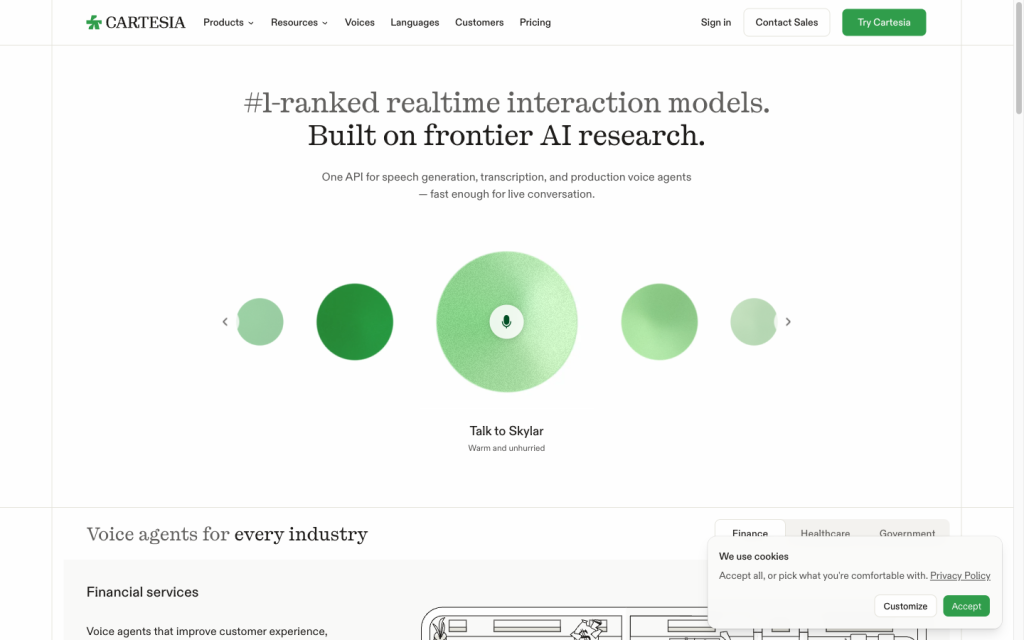
Cartesia product image
cartesia.ai
On this page

Cartesia is a developer-focused AI voice platform for teams building real-time speech into products. Its Sonic text-to-speech stack combines multilingual voices, voice cloning, pronunciation controls, and streaming delivery, while Ink adds streaming speech-to-text for agent workflows. It’s a particularly strong fit for technical teams that need API-level control, telephony-ready audio, and persistent real-time sessions rather than a traditional voiceover editing suite.

What is Cartesia?

Cartesia is a developer-first voice platform for real-time speech models and agents. Sonic handles text-to-speech and voice generation, while Ink provides streaming speech-to-text. Teams can use the Playground or APIs; Managed Agents is a separate interactive-call product that combines recognition, an LLM, and Sonic speech.

Voices and cloning

Sonic 3.6 supports 44 languages, while its release announcement lists 61 locales and more than 500 preset voices. Regional variants include several English, French, Spanish, Portuguese, and Arabic locales. Cartesia also offers Instant Voice Clone, Professional Voice Clone, voice conversion, dubbing, and localization workflows.

Instant cloning can start with about 10 seconds of audio, although longer clips improve accent retention. Professional cloning needs at least 30 minutes of clean single-speaker audio and can take up to three hours to train.

Pronunciation and delivery control

Cartesia supplies substantial implementation-level control: reusable pronunciation dictionaries, IPA-style and sounds-like guidance, locale and normalization settings, and spelling tags. SSML-like tags cover speed, volume, emotion, pauses, and spelling; break tags can request silence.

Speed ranges from 0.6 to 1.5 and volume from 0.5 to 2.0, but both are guidance rather than strict transformations. Emotion control is in beta, English-only, and can become less reliable with frequent changes or mid-generation adjustments. Dated Sonic snapshots help teams preserve consistent behavior, while Pro Voice Clones do not support request-time speed or volume settings.

Audio workflow and delivery

Cartesia provides three TTS delivery patterns: complete-response bytes, HTTP streaming through SSE, and persistent WebSocket sessions. Bytes work well for complete transcripts, caching, and WAV, MP3, or raw PCM output. SSE adds timestamps, while WebSocket supports partial input, continuations, multiplexing, and lower connection overhead across turns.

RAW output over SSE and WebSocket supports selectable codecs and sample rates from 8 kHz to 48 kHz. WebSocket continuations can retain prosody across partial messages under a shared context ID, and telephony guidance covers 8 kHz mu-law, 8 kHz A-law, and 16 kHz PCM use cases.

Who Cartesia fits

Cartesia is best suited to developers building voice into products: real-time conversational agents, call workflows, customer support, sales, training, media, accessibility, gaming, avatars, localization, and telephony. Its APIs, SDKs, streaming modes, and integrations prioritize product and engineering teams over users looking for a conventional narration editor.

It’s a strong option when API-level control, real-time delivery, multilingual output, and telephony-ready audio matter. Privacy-sensitive buyers should note that inputs, outputs, and user interactions may be used to improve models by default unless an applicable opt-out is requested; Enterprise Zero Data Retention excludes voice cloning and voice-creation workflows.

Buyer scenarios

Where the product fits — and where to be careful

Real-time voice-agent teams

Need
Low-latency speech generation, transcription, and production delivery for interactive calls.
Why it fits
Sonic supports streaming over SSE and WebSocket, telephony-compatible codecs and sample rates, official SDKs, and integrations including LiveKit, Pipecat, Twilio, and Tencent RTC.
Watch out
The workflow is API-focused and typically requires an API key; managed calling has separate per-minute charges.

Strong fit

Technical localization and voiceover teams

Need
Programmatic multilingual voiceovers, dubbing, or cloned voices with pronunciation control.
Why it fits
The platform offers multilingual TTS, locale controls, preset voices, cloning, pronunciation dictionaries, and downloadable WAV or MP3 through Bytes.
Watch out
It is not primarily a standalone narration editor, and beta emotion controls are English-only guidance rather than deterministic editing.

Good fit for technically capable teams

Pros & Cons

Pros

  • Strong multilingual Sonic 3.6 coverage, with 44 languages and 61 locales listed in its release announcement.
  • Detailed pronunciation, locale, timing, spelling, speed, volume, and pause controls for API workflows.
  • Flexible real-time delivery via Bytes, SSE, and persistent WebSocket sessions.
  • Official SDKs and integrations support agent, RTC, telephony, and MCP-client workflows.

Cons

  • Developer-first APIs and an API key are central to the workflow, making it less suited to a conventional narration-editor experience.
  • Emotion controls are beta, English-only, and guidance-based; frequent changes can reduce reliability.
  • Managed agent calling and usage overages introduce metered costs beyond plan subscriptions.
  • Professional Voice Clone needs at least 30 minutes of clean single-speaker audio and is limited to Startup and above.
Editorial score breakdown

Editorial scores

Editorial score
4.0
Audio workflow and delivery
4.0

Cartesia offers complete-response Bytes, HTTP SSE, and persistent WebSocket delivery, with WAV, MP3, RAW audio, selectable codecs and 8–48 kHz sample rates. WebSocket continuations and telephony guidance strengthen its fit for real-time production work.

Speech capabilities
4.0

Sonic 3.6 supports 44 languages, while its release announcement lists 61 locales and more than 500 preset voices. Instant and Professional cloning, voice conversion, dubbing, and localization extend the offering for product teams.

Pronunciation and style control
4.0

Reusable pronunciation dictionaries, locale and normalization settings, spelling and break tags, and request-level speed and volume controls provide strong implementation control. Emotion remains beta, English-only, and guidance-based, with limits on frequent changes.

Usability, support & value Not scored

User-review evidence was insufficient because the available aggregate is not publishable.

Pricing and contract model

Cartesia offers five plans, from a free tier to custom Enterprise pricing. Plans use model credits, with separately billed managed-agent minutes and workspace-level overage settings.

PlanPriceIncludes
Free
$0
per month
20,000 credits.
Pro
$5
per month
100,000 credits, commercial-use licensing, and Instant Voice Clone.
Startup
$49
per month
1.25 million credits and Professional Voice Cloning.
Scale
$299
per month
8 million credits, priority support, and higher concurrency limits.
  • Standard TTS costs approximately one credit per character.
  • Managed agent calling costs $0.06 per minute, plus $0.014 per minute for a Cartesia-provided phone number.
  • With overages enabled, excess usage is billed; with overages disabled, requests fail until renewal or upgrade.
  • Plans can be paused or canceled at any time, and every plan has unlimited workspace seats.

Integrations

Documented connections and access methods for Cartesia.

Messaging & collaboration

Real-time and telephony platforms Native

Developer/API

JavaScript/TypeScript and Python SDKs Native

AI protocol

MCP clients Protocol

Other

Deployment providers Other
Avaturn Other
  • Cartesia also supports TTS and STT through byte endpoints, Server-Sent Events, WebSockets, the Playground, and SDKs.

What's new

Recent product and company updates

  • 2026-08-27

    Sonic 3.6

    Sonic-3.6 added reported naturalness and multilingual improvements, 61 locales, more than 500 preset voices, Hinglish support, and improved Instant Voice Clone accent retention.

    Source
  • 2026-08-11

    Keyterm Prompting for Ink-2

    Ink-2 gained keyterm prompting and configurable turn detection for real-time voice-agent workflows.

    Source
  • 2026-07-09

    Ink-2

    Cartesia introduced Ink-2, a streaming speech-to-text model for real-time voice agents.

    Source

FAQ

How much does Cartesia cost?
Cartesia lists Free at $0 per month, Pro at $5 per month, Startup at $49 per month, Scale at $299 per month, and custom Enterprise pricing. Usage is metered with model credits, while managed agent calling is billed per minute.
How broad is Cartesia's voice and language offering?
Sonic 3.6 supports 44 languages. Its release announcement lists 61 locales and more than 500 preset voices, alongside Instant and Professional Voice Clone options.
What does Cartesia require for voice cloning?
Instant Voice Clone can begin with about 10 seconds of audio. Professional Voice Clone requires at least 30 minutes of clean, single-speaker audio, is available from Startup, and may take up to three hours to train.
Which audio formats and delivery methods does Cartesia support?
The Bytes endpoint supports RAW, WAV, and MP3 output. SSE and WebSocket deliver RAW audio; selectable encodings include PCM and telephony codecs, with sample rates from 8 kHz to 48 kHz.
Review transparency Corrections policy
Change history
  1. 2026-09-18 Initial publication First published version of this review.
26 sources analyzed
  1. Cartesia Sonic cartesia.ai
  2. Cartesia Documentation docs.cartesia.ai
  3. Sonic 3.6 cartesia.ai
  4. Cartesia Pricing cartesia.ai
  5. Cartesia Integrations docs.cartesia.ai
  6. Compare TTS Endpoints docs.cartesia.ai
  7. Custom Pronunciations docs.cartesia.ai
  8. Volume, Speed, and Emotion docs.cartesia.ai
  9. Keyterm Prompting for Ink-2 inside.cartesia.ai
  10. Ink-2 inside.cartesia.ai

Showing 10 of 26 sources · 16 additional sources analyzed

Feedback on this article

Was this review helpful?

Private editorial feedback. It does not change product ratings or rankings.

Rate Cartesia

Rate your experience
  • Audio workflow and delivery
  • Speech capabilities
  • Pronunciation and style control
  • Usability, support & value