
Capsule CRM logo

Capsule CRM

Capsule CRM is a focused cloud CRM for SMB teams that need relationship management, pipelines, tasks, automation, integrations, and practical reporting.

Editorial score

4.0 /5
How we scored it

Is Capsule CRM worth it?

Nick Oscar
Editor, Reviews.vc · Updated August 22, 2026
Good For

Strong People and Organization records with custom fields, tags, activity history, tasks, and files.

Caution

Workflow automation centers on a limited set of opportunity-based triggers and actions.

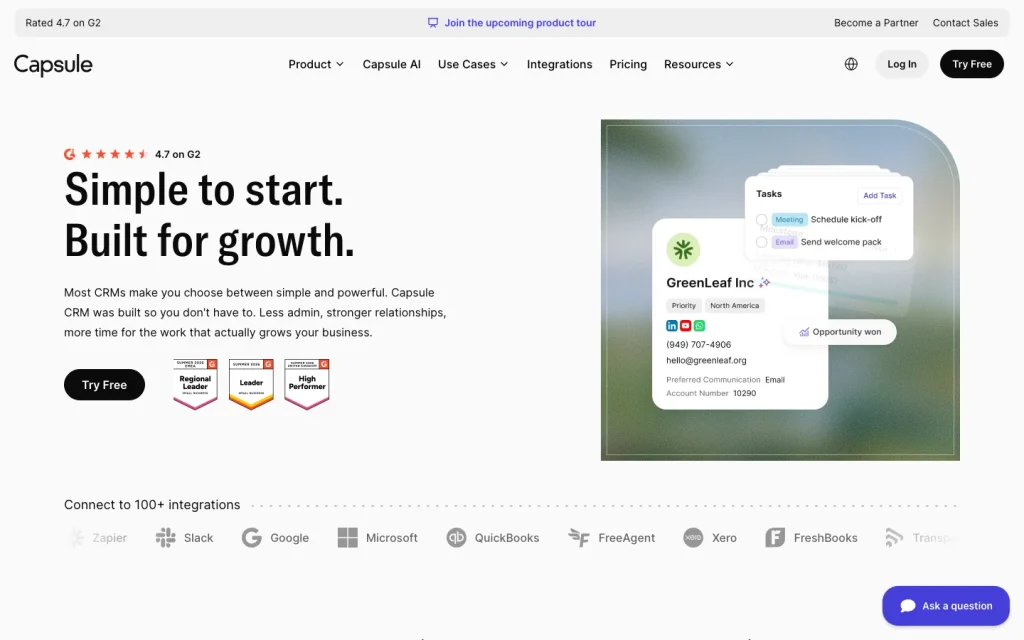
Capsule CRM product image
capsulecrm.com
On this page

Capsule CRM is a cloud-based CRM built for solopreneurs, small businesses, and growing SMB sales or service teams. It combines relationship records, tasks, opportunity pipelines, workflow automation, email tools, reporting, projects, mobile access, and a broad integration ecosystem.

Its appeal is a focused, approachable sales workspace with helpful structure for follow-up and pipeline visibility. Teams with advanced needs for deeply programmable automation, high-volume outreach sequences, enterprise governance, or predictive forecasting should assess those limits carefully.


What is Capsule CRM?

Capsule CRM is a cloud-based CRM for managing customer and supplier relationships, sales opportunities, communication history, tasks, projects, workflow automation, reporting, and mobile work. Its central records are People and Organizations, which can hold contact details, notes, emails, files, tags, custom fields, and activities.

Growth and higher plans add project boards with Kanban-style project management, extending the product beyond a basic contact database.

Contacts, tasks, and pipelines

Capsule gives teams structured Person and Organization records, including custom fields, tags, notes, emails, meetings, calls, and tasks. Tasks can be assigned, dated, repeated, and attached to contacts, opportunities, or projects. Tracks apply predefined task sequences with relative timing and responsibilities.

Sales records are Opportunities. Administrators configure milestones and win probabilities, while expected value and close date feed pipeline forecasts. The visual pipeline supports drag-and-drop progression, loss reasons, stale-deal flags, and pipeline-value views. Growth, Advanced, and Ultimate plans add support for multiple pipelines.

Automation and sales tools

Workflow Automations on Growth and higher plans handle repeatable pipeline and project processes. Available triggers include reaching a selected opportunity milestone or changing an opportunity to won or lost. Actions include assigning a user or team, adding a Track, and creating a linked project.

Capsule also connects Gmail, Outlook, Microsoft 365, and paid-plan SMTP mailboxes for record-based email, with reusable templates and dynamic fields on paid accounts. AI capabilities include Pipeline Generator on Starter, plus enrichment, activity summaries, and beta meeting preparation on Growth.

The automation model is useful for well-defined sales processes, but its available triggers and actions are narrower than those in deeply programmable, cross-object orchestration. Native multistep outbound sales sequences are not yet established.

Integrations and reporting

Capsule offers 100+ integrations spanning accounting, calendars, communications, analytics, email, help desk, marketing, forms, telephony, project management, and automation platforms. Notable options include Gmail, Google Calendar, Outlook, Xero, QuickBooks Online, FreshBooks, Mailchimp, Zapier, Make, Microsoft Power Automate, Zoom, and Looker Studio.

For bespoke integrations, Capsule offers a REST API with OAuth 2 and personal access tokens. Native sales reports cover pipeline forecasts, pipeline by milestone, conversion rate, pipeline by tag, and won/lost performance over time. Growth, Advanced, and Ultimate plans add shareable custom dashboards built from activity, task, sales, and project reports.

Who should choose Capsule CRM?

Capsule CRM is best suited to solopreneurs, startups, small businesses, and growing SMB sales or service teams that want accessible relationship management, task follow-up, opportunity pipelines, projects, and practical sales reporting. Its plans support starting small, then adding automation, dashboards, projects, and multiple pipelines as needs grow.

It is less suitable for organizations that require deeply programmable event-driven automation across objects, native high-volume sales engagement, highly granular enterprise governance, or sophisticated predictive forecasting.

Buyer scenarios

Where the product fits — and where to be careful

Growing SMB sales or service team

Need
A straightforward CRM for relationship management, follow-up, pipelines, and sales visibility.
Why it fits
People and Organization records, visual opportunities, tasks, Tracks, practical reporting, and Growth-tier automation provide a focused operating system for day-to-day relationship selling.
Watch out
Native workflow triggers center on opportunity milestones and won/lost changes, and native multistep outbound sales sequencing is not established.

Strong fit

Solo operator or small business

Need
An accessible CRM that can start small and add sales-process structure as the team grows.
Why it fits
The Free plan supports up to two users, while paid plans add email tools, workflow automation, projects, dashboards, and broader pipeline options.
Watch out
Teams needing deeply programmable cross-object automation, high-volume sequencing, granular enterprise governance, or predictive forecasting may exceed its scope.

Good fit

Pros & Cons

Pros

  • Strong People and Organization records with custom fields, tags, activity history, tasks, and files.
  • Visual opportunity pipelines support configurable milestones, probabilities, forecasts, lost reasons, and stale-deal flags.
  • Growth and higher plans add practical workflow automation, multiple pipelines, custom dashboards, and project boards.
  • Broad marketplace coverage plus a REST API, OAuth 2, and personal access tokens.
  • User reviews strongly favor ease of use, support, and value for money.

Cons

  • Workflow automation centers on a limited set of opportunity-based triggers and actions.
  • Native multistep outbound sales sequencing is not established.
  • Probability-weighted pipeline forecasting is less sophisticated than predictive forecasting.
  • The Free plan has tight limits on users, contacts, custom fields, and pipelines.
Editorial score breakdown

Editorial scores

Editorial score
4.0
Usability, support & value
4.0

Across 89 accepted reviews from three sources, ease of use, support, and value for money are frequently mentioned and predominantly positive.

Core CRM
4.0

Capsule provides structured People and Organization records, custom fields, activities, tasks, Tracks, configurable opportunities, visual pipelines, and forecasting for SMB sales workflows.

Integrations & reporting
4.0

Capsule lists 100+ integrations, offers REST API access with OAuth 2, and provides sales reports, probability-weighted forecasts, custom dashboards, and Looker Studio connectivity.

Automation & sales tools Not scored

The available evidence is insufficient for a supported score.

Customer sentiment

Capsule CRM customer reviews and sentiment

Based on 89 public customer reviews. Source mix: 66 from trustpilot.com, 13 from softwareadvice.com, and 10 from trustradius.com.

Customer sentiment is analyzed separately and does not determine the Reviews.vc editorial score.

89 public reviews analyzed
Positive
79%70 reviews
Mixed
17%15 reviews
Negative
4%4 reviews
Theme and findingMentionsPositiveNegative
Ease of use
Buyers consistently find Capsule quick to learn and intuitive to navigate, with setup and day-to-day use requiring little training; a smaller set reports usability or interface frustrations.
655911
Contact and pipeline management
Contact records, activity history, tasks, tags, and customizable pipelines help teams centralize client information and keep follow-ups and opportunities from being missed.
46426
Support
Support is commonly described as responsive, thorough, and effective at resolving issues, though message-based support can feel slow when an urgent setup need arises.
28263
Integrations
Integrations with tools such as Xero, Office 365, and Transpond reduce duplicate work and support automation, but some third-party connections require workarounds or are reported as glitchy.
262210
Value for money
Reviewers see Capsule as an affordable option for small teams, particularly because of its free tier and functionality relative to more expensive CRMs; some note that larger or more complex organizations may need broader features.
26242

Mentions count unique reviews. One review can count as both positive and negative for the same theme when it describes a mixed experience.

This analysis reflects public customer reviews we could identify and access at the time of collection; the displayed source mix may influence the patterns shown.

Review sentiment over time

PeriodnPositiveMixedNegative
2025 Q2Limited sample1001
2025 Q4161501
2026 Q15401
2026 Q3Limited sample1100

Only periods containing dated reviews are shown; gaps between labels mean no dated reviews were available for those periods.

Pricing and contract model

Capsule publishes a Free plan and four paid plans. Annual paid pricing ranges from US$18 to US$72 per user per month; monthly payment is also available. Paid plans include a 14-day free trial without a card and no setup or onboarding fees.

PlanPriceIncludes
Free
Free
monthly
Up to 2 users, 250 contacts, 5 custom fields, and 1 sales pipeline.
Starter
US$18 per user
per month, billed annually
Paid Starter plan on annual billing.
Growth
US$36 per user
per month, billed annually
Paid Growth plan on annual billing.
Advanced
US$54 per user
per month, billed annually
Paid Advanced plan on annual billing.
Ultimate
US$72 per user
per month, billed annually
Paid Ultimate plan on annual billing.
  • Monthly payment is available.
  • Paid plans include a 14-day trial without a card.

Integrations

Documented connections and access methods for Capsule CRM.

Automation

Zapier Native

Developer/API

Capsule REST API Public API

Productivity suite

Google Workspace Native
Microsoft 365 and Outlook Native

Data warehouse/BI

Looker Studio Native

Procurement/ERP

Xero Native
QuickBooks Online Native
  • Capsule lists 100+ integrations on its homepage.

What's new

Recent product and company updates

  • 2025-10-14

    Bring Outlook and Gmail into Capsule CRM

    Capsule expanded Gmail and Outlook connections with automatic email logging, richer calendar integration, event creation in Capsule, and the ability to join scheduled events.

    Source
  • 2026-03-11

    Uncapped Live: AI in Capsule CRM

    Capsule announced an Uncapped Live product event covering AI technologies in the CRM and its 2026 product roadmap.

    Source

FAQ

What does Capsule CRM cost?
Capsule offers a Free plan plus Starter, Growth, Advanced, and Ultimate plans. Annual pricing is US$18, US$36, US$54, and US$72 per user per month for the paid plans, respectively.
What can Capsule CRM manage?
Capsule manages People and Organization records, communication history, tasks, sales opportunities, pipelines, projects, reporting, and mobile access.
Does Capsule CRM provide workflow automation?
Yes. Growth and higher plans provide Workflow Automations for repeatable pipeline and project processes, including tasks, email notifications, stage changes, assignments, Tracks, and linked projects.
Does Capsule CRM integrate with Google, Microsoft, and accounting tools?
Yes. Its marketplace includes Gmail, Google Calendar, Microsoft Outlook, Xero, QuickBooks Online, FreshBooks, Zapier, Make, Microsoft Power Automate, and other connectors. Capsule also provides a REST API with OAuth 2.
Who is Capsule CRM best for?
Capsule is suited to solopreneurs, startups, small businesses, and growing SMB sales or service teams that need relationship management, follow-up tasks, opportunity pipelines, and practical reporting.
Change notes Corrections policy
  1. 2026-08-22 Initial publication First published version of this review.
Sources analyzed (19)
  1. Capsule CRM Features capsulecrm.com
  2. Capsule CRM Signup and Plans capsulecrm.com
  3. Capsule CRM Integrations capsulecrm.com
  4. How to integrate with Capsule capsulecrm.com
  5. What are contacts? capsulecrm.com
  6. Stages of an opportunity capsulecrm.com
  7. Getting started with Workflow Automation capsulecrm.com
  8. Reporting on your sales capsulecrm.com
  9. Bring Outlook and Gmail into Capsule CRM capsulecrm.com
  10. Uncapped Live: AI in Capsule CRM capsulecrm.com

Showing 10 of 19 sources · 9 additional sources analyzed

Feedback on this article

Did this Review help you evaluate Capsule CRM?

Private editorial feedback. It does not change product ratings or rankings.

Rate Capsule CRM

Rate your experience
  • Usability, support & value
  • Core CRM
  • Integrations & reporting
  • Automation & sales tools