
Common Room logo

Common Room

Common Room unifies buyer signals, scoring, AI-assisted research, and GTM activation for B2B RevOps, sales, and marketing teams.

Editorial score

3.8 /5
How we scored it

Is Common Room worth it?

Nick Oscar
Editor, Reviews.vc · Updated July 24, 2026
Good For

Common Room brings together buyer signals from customer, product, CRM, community, social, code collaboration, marketing, and engagement sources.

Caution

Workflow changes can require deactivating and recreating a workflow; failed workflow contacts are not automatically retried, and logs can be delayed.

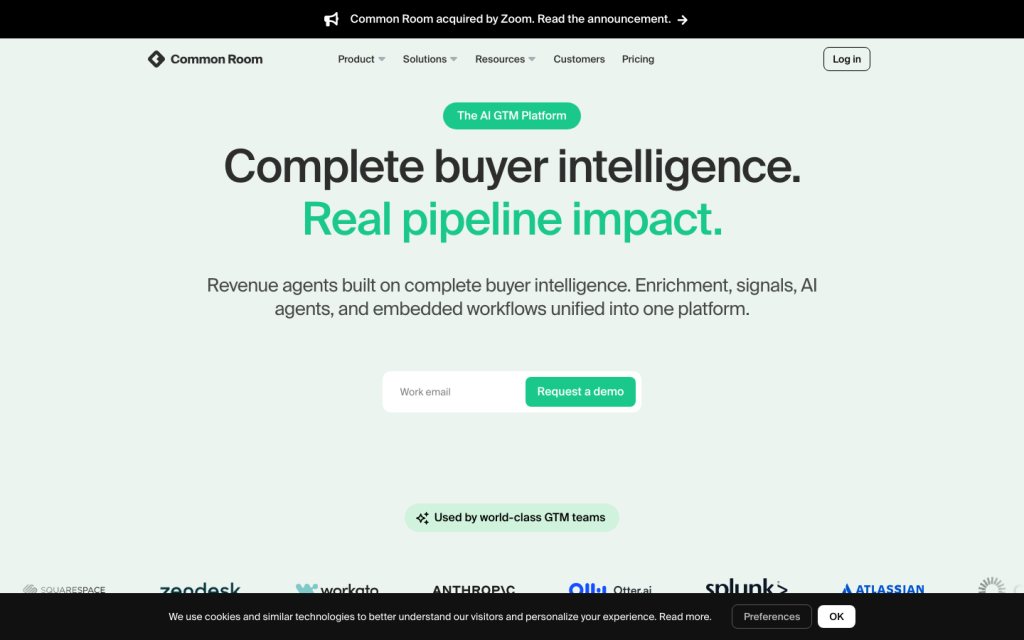
Common Room product image
commonroom.io

Common Room is an AI GTM platform for mid-market and enterprise B2B RevOps, sales, and marketing teams that need to turn buyer activity into prioritized, actionable work. It brings together first-, second-, and third-party signals; identity resolution and enrichment; scoring; AI-assisted research; and CRM- and workflow-led activation. It is best suited for teams willing to configure data mappings, scores, prompts, and workflows rather than buyers looking for a lightweight point solution.


What is it?

Common Room is positioned as an AI GTM platform centered on buyer intelligence and activation. Its documented workflow connects signal capture, person and account context, enrichment, scoring, research, personalization, and downstream actions. The core job is not to replace every GTM system; it is to help teams identify relevant buyers and move qualified context into the systems and plays they already operate.

That makes the product most relevant where multiple signal sources need to be reconciled into a shared account and contact view. It also means implementation is consequential: field mapping, score models, prompts, filters, workflows, CRM prerequisites, and integrations are part of the documented setup.

Data and signals

Common Room documents inputs spanning first-party customer data and real-world buyer activity, including website visitors, job changes and hiring trends, product-led sales activity, CRM and call-transcript data, and open-source activity. Its integration catalog also covers social, community, product-usage, code-collaboration, marketing, and engagement data.

Administrators can define contact and organization scores using fit and behavioral rules with custom weights. DataAgent adds a Salesforce-focused data-quality use case by examining synced records for duplicate and stale data. Buyers should validate the signal sources available to their plan and configuration, plus the quality of matching and enrichment for their own market, because published material does not provide a universal accuracy or freshness SLA.

AI workflows and activation

RoomieAI supports questions about accounts and contacts, bespoke signal capture, account research, and organization research that can combine internet search with AI analysis and save findings as team notes. Message Snippets can draft email and LinkedIn personalization from contact and organization data, dynamic variables, and mapped signals.

Activation is workflow-led. Documented triggers include scheduled runs, detected activity, new contacts or organizations, website visits, and selected Slack or Discord events. Actions can send work to Slack, Discord, webhooks, Outreach, HubSpot, Salesforce campaigns, Apollo, and Prospector. Teams should retain review steps for AI-generated messaging: the product documentation specifically warns that nuanced business and relationship understanding can raise hallucination risk.

Integrations and analytics

Salesforce and HubSpot are documented as bidirectional CRM connections. Salesforce can receive signals, qualification status, engagement context, and configured record updates; HubSpot supports contacts, companies, deals, mapped fields, selected activity sync options, and widgets. Common Room also documents warehouse, community, social, sales-engagement, API, webhook, browser-extension, and MCP access paths.

For reporting, Business Overview documents Salesforce-connected views for meetings booked, pipeline generated, and closed-won outcomes. This reporting requires Salesforce, an admin role, shared Salesforce activities, and a qualifying plan. Buyers using HubSpot should scrutinize implementation planning: customer reviews repeatedly mention setup, sync, and activation challenges.

Who it's for

Common Room fits mid-market and enterprise B2B RevOps, sales, and marketing teams running signal-led account prioritization and outreach motions. It is particularly relevant when buyer activity is spread across CRM, product, community, social, and other GTM systems, and when teams need scored, enriched context delivered into a CRM or execution workflow.

The tradeoff is operational complexity. Teams should have owners for data mapping, scoring logic, workflow design, CRM configuration, and output review. Organizations seeking minimal configuration or expecting AI-generated messaging to run without rep oversight should assess that fit carefully.

Buyer scenarios

Where the product fits — and where to be careful

Signal-led B2B account prioritization

Need
A RevOps-led team needs to reconcile buyer activity across CRM, product, community, social, and other GTM sources, then prioritize accounts and contacts for sales and marketing follow-up.
Why it fits
Common Room combines documented signal collection, identity resolution, enrichment, custom scoring, AI research, and workflow actions into CRM and sales-engagement surfaces.
Watch out
The team must plan for field mapping, score and workflow configuration, and ongoing signal-quality tuning; failed workflow contacts are not automatically retried.

A good fit when a GTM operations owner can govern data and workflows and the business has multiple meaningful signal sources.

Salesforce-centered CRM data hygiene and activation

Need
A B2B team using Salesforce wants to identify stale or duplicate records while passing qualification and engagement context back to CRM records and campaigns.
Why it fits
Common Room's DataAgent is documented for Salesforce data-quality work, while its Salesforce integration supports configured bidirectional context and record updates. Salesforce-connected reporting can cover meetings, pipeline, and closed-won outcomes when prerequisites are met.
Watch out
Reporting requires Salesforce setup, admin access, shared activities, and a qualifying plan; DataAgent availability by plan is not publicly specified.

A strong candidate for Salesforce-centric teams that can validate plan eligibility and configure their CRM governance model.

Pros & Cons

Pros

  • Common Room brings together buyer signals from customer, product, CRM, community, social, code collaboration, marketing, and engagement sources.
  • It supports configurable contact and organization scoring with fit and behavioral rules; score models refresh every four hours.
  • It offers bidirectional Salesforce and HubSpot connections, workflow actions, webhooks, API access, and an MCP server.
  • Its AI features support account research, signal capture, personalization drafts, and saved research notes.
  • Public Essential pricing provides a concrete starting point for a five-seat deployment.

Cons

  • Workflow changes can require deactivating and recreating a workflow; failed workflow contacts are not automatically retried, and logs can be delayed.
  • Message Snippets documentation advises review before action because nuanced product, relationship, and business context can produce hallucinations.
  • Customer reviews describe recurring HubSpot setup, sync, and activation friction.
  • Review feedback points to occasional unclear triggers or poor records and a need to tune signal quality.
  • Some reviewers find navigation, account organization, reporting, and view customization cumbersome.
Editorial score breakdown

Editorial scores

Editorial score
3.8
Data & signals
4.0

Common Room documents broad buyer-signal coverage across first-, second-, and third-party sources, configurable scoring, identity-resolution inputs, and CRM data-quality workflows. Reviews value unified intent and engagement signals, while noting that signal quality may need tuning and that records or triggers can occasionally be unclear.

AI & workflow automation
4.0

Documented AI workflows cover account and contact questions, bespoke signal capture, internet-assisted organization research, personalization drafts, and workflow-triggered activation. The workflow surface is substantial, though configuration constraints, no automatic retry for failed contacts, delayed logs, and reviewer concerns about workflow maturity limit the score.

Activation & integrations
4.0

Common Room supports documented CRM writeback, sales-engagement and messaging actions, webhooks, REST API ingestion, an MCP server, and a broad named connection catalog. Salesforce capabilities are especially detailed; customer reviews identify HubSpot setup and sync as a material friction point.

Usability, support & value
3.0

Public reviews present a mixed picture: some buyers describe an intuitive interface and responsive implementation help, while others cite navigation and reporting friction, slow issue resolution, and a need for more customer-success guidance. The available review evidence does not establish consistently strong usability or support.

Customer sentiment

Common Room customer reviews and sentiment

Based on 13 public customer reviews. Source mix: 10 from g2.com, and 3 from trustradius.com.

Customer sentiment is analyzed separately and does not determine the Reviews.vc editorial score.

13 public reviews analyzed
Positive
15%2 reviews
Mixed
85%11 reviews
Negative
0%0 reviews
Theme and findingMentionsPositiveNegative
Data and signal quality
Buyers value the unified intent and engagement signals for prioritizing accounts and contacts, but report occasional ambiguous triggers, bad records, and an initial need to tune signal quality.
12124
Ease of use
The core interface is generally seen as intuitive and easy to adopt, while account organization, navigation, reporting, and view customization can be confusing or cumbersome.
752
Integrations
HubSpot integration is a recurring friction point, with difficult setup, sync issues, and challenges making Common Room data actionable; buyers also want broader marketing and sales-tool integrations.
624
Support
Support is described inconsistently: some buyers praise hands-on, responsive implementation help, while others cite slow issue resolution and want more customer-success guidance for prospecting plays.
422
Workflow flexibility
Simple workflows are possible, but buyers find some rep flows and saved-search plays immature or hacky and want stronger orchestration for ABM, AI, and prospecting use cases.
313

Mentions count unique reviews. One review can count as both positive and negative for the same theme when it describes a mixed experience.

This analysis reflects public customer reviews we could identify and access at the time of collection; the displayed source mix may influence the patterns shown.

Pricing and contract model

Essential is publicly listed at $2,500 per month, billed annually, for five seats. Advanced and Enterprise require custom pricing; a personalized demo is available, and the reviewed official pages do not state a public free trial.

PlanPriceIncludes
Essential
$2,500/mo
billed annually
$2,500 per month billed annually for five seats; includes up to 100,000 contacts, research and Prospector credits, unlimited alerts, workflows and segments, select integrations, and a shared CSM.

Integrations

Documented connections and access methods for Common Room.

CRM

HubSpot Native
Salesforce Native
Salesforce Managed Package Embedded
Salesforce Widget Embedded

Automation

Zapier Via automation

Messaging & collaboration

Bevy Native
Discord Native
DEV Native
Gradual Native
Influitive Native
InSided Native
Intercom Native
Khoros Native
LinkedIn Native
Medium Native
Meetup Native
Reddit Native
Salesforce Experience Cloud Native
Stack Overflow Native
Twitter Native
YouTube Native

AI protocol

Claude Connector and Plugin Protocol
MCP Server Protocol
AI assistants Embedded
Spark Embedded

Productivity suite

Google Sheets Native
Email Embedded

Data warehouse/BI

BigQuery Native
Census Native
Hightouch Native
Redshift Native
Amazon S3 Native
Snowflake Native

Identity/SSO

Okta Native

Browser extension

Chrome Extension Embedded

Data import/export

CSV Native

Other

6sense Native
Apollo Native
Demandbase Native
Groove Native
Koala Native
MadKudu Native
Marketo Native
Outreach Native
Qualified Native
Salesloft Native
Scarf Native
TechTarget Native
Toplyne Native
G2 Native
GitHub Native
Shopify Native
Skilljar Native

Recent signals

Product and company changes worth checking

  • 2026-07-02 · ownership change

    Zoom to acquire Common Room, bringing buyer intelligence to Zoom's AI revenue platform

    Zoom announced an agreement to acquire Common Room on July 2, 2026.

    Source
  • 2026-02-24 · product release

    Common Room now connects to Claude

    Common Room announced its MCP Connector and Claude Plugin on February 24, 2026.

    Source

FAQ

How much does Common Room cost?
Common Room lists Essential at $2,500 per month, billed annually, for five seats. Advanced and Enterprise are custom-priced. The reviewed official pricing and demo pages advertise personalized demos but do not state a public free-trial offer.
Which GTM workflows does Common Room support?
Common Room supports buyer-signal capture, identity resolution and enrichment, contact and organization scoring, account research, AI-assisted personalization, CRM data-quality work, and workflow-based activation to CRM, sales-engagement, messaging, webhook, and related surfaces.
How does Common Room use AI in GTM workflows?
Its documented AI capabilities include answering account and contact questions from Common Room data, bespoke signal capture, organization research using internet search and AI analysis, and email or LinkedIn personalization drafts. Documentation recommends rep review and augmentation before acting on nuanced outputs.
What does Common Room integrate with?
Documented connections include Salesforce, HubSpot, sales engagement tools, warehouses, community and social platforms, CSV, Google Sheets, Zapier, webhooks, a REST API, a Chrome extension, and MCP- and Claude-related AI access. Specific availability can depend on plan and configuration.
Who is Common Room best for?
Common Room is best for mid-market and enterprise B2B RevOps, sales, and marketing teams that need to unify buyer signals, prioritize accounts and contacts, and activate structured plays through an existing GTM stack.
Change notes Corrections policy
  1. 2026-07-24 updated Review updated
Sources analyzed (28)
  1. Enrichment. Signals. AI agents. All of it, finally unified. www.commonroom.io accessed 2026-07-23
  2. Careers | Common Room www.commonroom.io accessed 2026-07-23
  3. How to Use DataAgent | Common Room (Docs) www.commonroom.io accessed 2026-07-23
  4. Zoom to acquire Common Room, bringing buyer intelligence to Zoom's AI revenue platform www.zoom.com accessed 2026-07-23
  5. About the platform | Common Room www.commonroom.io accessed 2026-07-23
  6. Signals: Never miss a buying signal | Common Room www.commonroom.io accessed 2026-07-23
  7. Technographics | Common Room (Docs) www.commonroom.io accessed 2026-07-23
  8. Scores Guide | Common Room (Docs) www.commonroom.io accessed 2026-07-23
  9. Integrations | Common Room www.commonroom.io accessed 2026-07-23
  10. HubSpot CRM Integration Guide | Common Room (Docs) www.commonroom.io accessed 2026-07-23

Showing 10 of 28 sources · 18 additional sources analyzed

Leave Review
Rate your experience
  • Data & signals
  • AI & workflow automation
  • Activation & integrations
  • Usability, support & value