
Luma AI logo

Luma AI

Luma AI combines Ray 3.2 video generation and detailed controls with a multimodal creative workspace and API.

Editorial score

3.5 /5
How we scored it

Is Luma AI worth it?

Nick Oscar
Editor, Reviews.vc · Updated September 18, 2026
Good For

Broad native generation modes: text-to-video, image-to-video, multi-keyframe, video-to-video, extension, and reframing.

Caution

Native Ray generations are normally limited to five or ten seconds, making long-form output an assembly workflow.

Luma AI product image
lumalabs.ai
On this page

Luma AI is a multimodal creative workspace centered on Ray 3.2, an AI video model for text-to-video, image-to-video, video transformation, extension, and reframing. Its strongest use case is creative production that benefits from keyframe direction, HDR and EXR output, collaborative boards, and API access. Buyers should plan around short native clips, credit-based generation costs, and notably negative accepted user feedback on value and support.

What is Luma AI?

Luma AI is a multimodal creative workspace with Ray 3.2 as its native AI video model. Ray 3.2 generates video from text or image anchors and supports video-to-video editing, extension, reframing, keyframe-directed generation, HDR output, and EXR export. The broader workspace brings image, video, audio, voice, captions, editing, and project organization together.

Video generation capabilities

Ray 3.2 covers text-to-video, image-to-video, multi-keyframe generation, video-to-video transformation, extension, and reframing. Image-to-video can use a start frame, an end frame, or both, while multi-keyframe generation can position one to 64 guide images at selected frame indices. Native text and image generations run for five or ten seconds and range from 360p draft to 1080p.

Creative control

Luma offers meaningful direction beyond a basic text request. Prompts can specify subject, motion, camera movement, lighting, and pacing; start and end frames shape shot progression; and guide frames provide additional visual direction. Video editing includes adherence, flex, and reimagine strength settings, while manual conditioning can use depth or scene geometry and face identity signals. Resolution, aspect ratio, duration, loop, HDR, EXR, and reframing position are also configurable within supported combinations.

Output and workflow

The workspace uses boards, shared context, collaboration, and project-level asset organization. It can organize assets, stitch clips, add captions and audio, and assemble deliverables. Completed Ray 3.2 generations are delivered as MP4 files, with HDR MP4 and EXR options for color grading and VFX workflows. Developers can submit jobs asynchronously, poll for status, download results, and use Python or TypeScript tooling.

Who Luma AI is for

Luma is a strong match for agencies, production studios, filmmakers, game creators, brand teams, and developers producing creative campaigns, storyboards, product visuals, social ads, or VFX work. It is particularly useful for teams that need both generated clips and transformation of existing footage. It is less suited to buyers seeking a licensed stock-footage catalog or a conventional platform centered on prebuilt corporate presenter avatars.

Buyer scenarios

Where the product fits — and where to be careful

Creative production and VFX teams

Need
Generate, transform, and finish short-form creative video for campaigns, social work, storyboards, product visuals, or VFX.
Why it fits
Ray 3.2 combines text, image, multi-keyframe, video-to-video, extension, and reframing workflows with HDR and EXR output.
Watch out
Native clips are normally five or ten seconds, so longer work requires extensions or multi-clip assembly; high-resolution and HDR work can consume credits quickly.

Strong fit

Product teams building video features

Need
Embed video generation or transformation in a product or production system.
Why it fits
The API provides asynchronous generation, callbacks, downloads, image and video inputs, video modification, reframing, and official Python and JavaScript tooling.
Watch out
API usage is pay-as-you-go, subject to rate limits, and has no latency SLA.

Strong fit for custom workflows

Pros & Cons

Pros

  • Broad native generation modes: text-to-video, image-to-video, multi-keyframe, video-to-video, extension, and reframing.
  • Detailed creative controls include anchors, up to 64 guide frames, editing strengths, conditioning, HDR, and EXR.
  • Board-based workspace supports collaboration, asset organization, captions, audio, and clip assembly.
  • Public API, Python and JavaScript tooling, asynchronous jobs, and production-oriented export options.

Cons

  • Native Ray generations are normally limited to five or ten seconds, making long-form output an assembly workflow.
  • High-resolution, HDR, EXR, and video-to-video work can consume credits quickly.
  • Accepted user feedback is overwhelmingly negative, particularly on value, support, generation outcomes, and workflow.
Editorial score breakdown

Editorial scores

Editorial score
3.5
Generation capabilities
4.0

Ray 3.2 supports text, image, multi-keyframe, video-to-video, extension, and reframing workflows, with output through 1080p. Native clip duration remains five or ten seconds.

Output and workflow
4.0

Boards, collaboration, captions, audio, clip stitching, MP4 delivery, HDR/EXR output, and asynchronous API workflows support production use, while longer work requires multi-clip assembly.

Creative control
4.0

Prompt detail, image anchors, up to 64 guide frames, edit-strength settings, conditioning signals, reframing position, and output settings offer strong creative direction.

Usability, support & value
2.0

Accepted user feedback is predominantly negative. Value for money and support receive repeated negative mentions, with additional negative feedback on generation and workflow.

Customer sentiment

Luma AI customer reviews and sentiment

Based on 21 public customer reviews. Source mix: 20 from trustpilot.com, and 1 from producthunt.com.

Customer sentiment is analyzed separately and does not determine the Reviews.vc editorial score.

21 public reviews analyzed
Positive
0%0 reviews
Mixed
5%1 reviews
Negative
95%20 reviews
Theme and findingMentionsPositiveNegative
Value for money
Credits can be depleted quickly by failed, unwanted, or repeated generations, making costs feel unpredictable and poor value.
19019
Generation capabilities
Generation quality is inconsistent: outputs can ignore simple prompts, introduce errors, or fail to produce a usable video.
13512
Output and workflow
The workflow is reported as cumbersome and unreliable, with media-upload issues, unresponsive interfaces, stuck jobs, and limited ability to revise outputs.
1029
Support
Reviewers report slow or absent support responses, including for billing, account-access, and nonworking-product problems.
808
Creative control
Users report limited control over results: the AI misinterprets instructions, changes requested details, and makes corrections difficult without restarting.
606

Mentions count unique reviews. One review can count as both positive and negative for the same theme when it describes a mixed experience.

This analysis reflects public customer reviews we could identify and access at the time of collection; the displayed source mix may influence the patterns shown.

Review sentiment over time

PeriodnPositiveMixedNegative
2025 H1Limited sample1001
2026 H1120012
2026 H28017

Only periods containing dated reviews are shown; gaps between labels mean no dated reviews were available for those periods.

Pricing and contract model

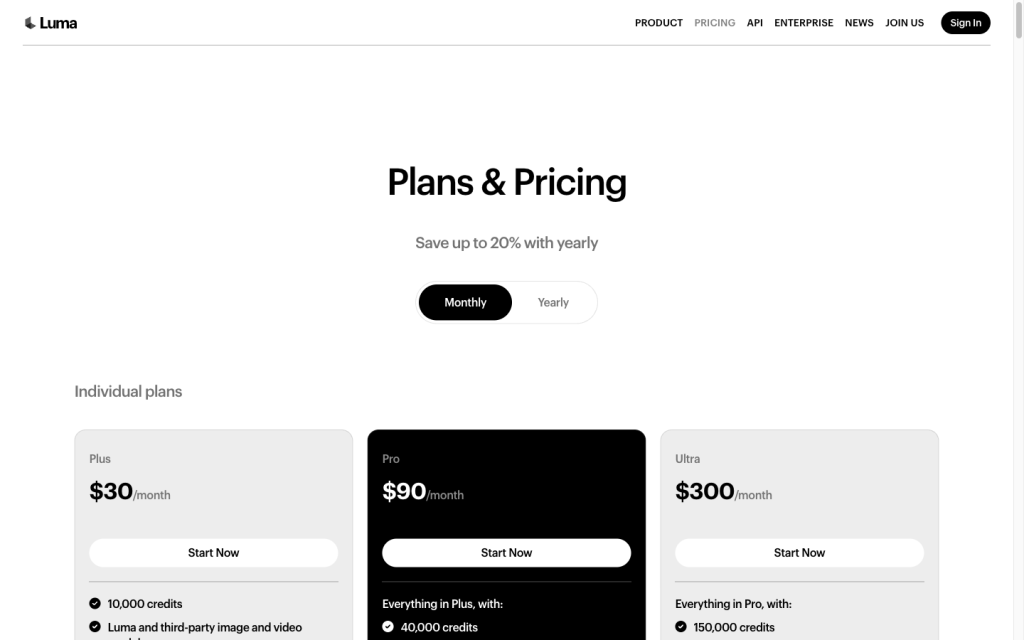
Luma lists public individual plans and quote-based Team and Enterprise plans. API usage is pay-as-you-go with no minimum commitment, subject to rate limits and no latency SLA.

PlanPriceIncludes
Plus
$30/month or $300/year
monthly or annual
Individual Plus plan.
Pro
$90/month or $900/year
monthly or annual
Individual Pro plan.
Ultra
$300/month or $3,000/year
monthly or annual
Individual Ultra plan.
  • Ray 3.2 generation credit cost varies by action, duration, resolution, and format. A five-second text or image generation is listed at 20 credits for draft, 50 for 540p, 100 for 720p, and 400 for 1080p.

Integrations

Documented connections and access methods for Luma AI.

Developer/API

Luma API Public API
Python and JavaScript SDKs Public API

Marketplace

Partner platforms Public API

Other

Third-party creative models Embedded
  • Luma supports 16-bit EXR export for compositing workflows in Resolve or Nuke.

What's new

Recent product and company updates

  • 2026-08-11

    Introducing Luma Scenes

    Luma announced Luma Scenes.

    Source
  • 2026-06-09

    Introducing Ray 3.2

    Luma announced Ray 3.2 and its API, adding frame-level control and API access for enterprise products and custom workflows.

    Source

FAQ

How much do Luma AI individual plans cost?
Plus costs $30 per month, Pro costs $90 per month, and Ultra costs $300 per month. Annual billing is listed at $300, $900, and $3,000 respectively.
What video generation modes does Ray 3.2 support?
Ray 3.2 supports text-to-video, image-to-video, multi-keyframe generation, video-to-video editing, extension, and reframing.
What controls are available for directing a Luma video?
Controls include prompts, start and end image anchors, up to 64 guide frames, editing-strength settings, conditioning signals, aspect ratio, resolution, duration, loop, HDR, EXR, and reframing position.
What are Luma's main video limits?
Native text and image generations are five or ten seconds. Uploaded or hosted source video editing is capped at 18 seconds, and API usage is subject to rate limits.
Review transparency Corrections policy
Change history
  1. 2026-09-18 Initial publication First published version of this review.
23 sources analyzed
  1. Luma LLM information lumalabs.ai
  2. Video generation guide docs.agents.lumalabs.ai
  3. Luma pricing lumalabs.ai
  4. Luma API lumalabs.ai
  5. Luma Agents app lumalabs.ai
  6. Video editing guide docs.agents.lumalabs.ai
  7. Video reframing guide docs.agents.lumalabs.ai
  8. Frequently asked questions about the new Luma Agents app lumalabs.ai
  9. Introducing Luma Scenes lumalabs.ai
  10. Introducing Ray 3.2 lumalabs.ai

Showing 10 of 23 sources · 13 additional sources analyzed

Feedback on this article

Was this review helpful?

Private editorial feedback. It does not change product ratings or rankings.

Rate Luma AI

Rate your experience
  • Generation capabilities
  • Output and workflow
  • Creative control
  • Usability, support & value