
Claude Code logo

Claude Code

Claude Code is an agentic coding tool for supervised repository work across terminal, IDE, cloud, and CI workflows.

Editorial score

4.3 /5
How we scored it

Is Claude Code worth it?

Nick Oscar
Editor, Reviews.vc · Updated September 18, 2026
Good For

Reads repositories, edits files, runs commands, and runs tests for multi-step development work.

Caution

Context is finite and automatically compacted, which can constrain long or complex tasks.

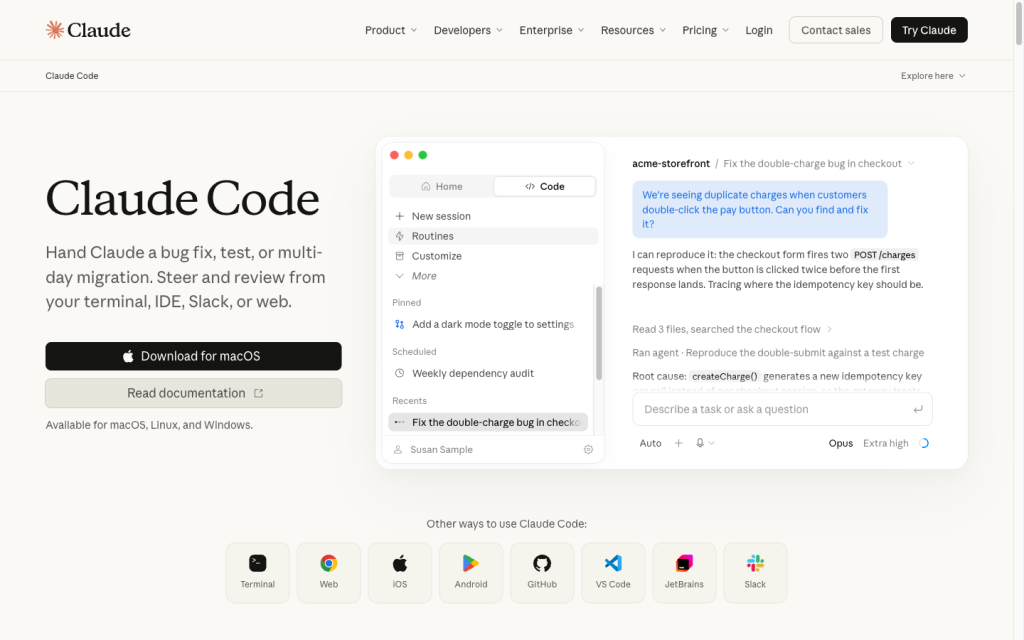
Claude Code product image
anthropic.com
On this page

Claude Code is Anthropic’s agentic coding tool for exploring repositories, editing files, running commands and tests, and connecting development work to terminals, IDEs, cloud sessions, and CI/CD. Its strongest fit is supervised, hands-on software delivery: it pairs broad coding and workflow coverage with configurable permissions, review surfaces, and team governance. Buyers should still factor in finite context, usage limits, configuration complexity, and the need for human review.

What is Claude Code?

Claude Code is Anthropic’s agentic coding tool. It can read a codebase, edit files, run commands and tests, and work with terminal, IDE, cloud, and CI workflows. It supports local repositories and cloud sessions across CLI, desktop, IDE, web, and mobile.

It is designed for active development work rather than guaranteed autonomous delivery: generated code and completed tasks still require appropriate engineering review.

Coding capabilities

Claude Code supports repository search and explanation, multi-file editing, bug fixes, tests, refactors, migrations, feature work, commits, and pull request creation. It can follow imports during refactors and migrations, while VS Code adds inline diffs, file and line-range mentions, and plan review.

GitHub Actions can analyze code, implement configured changes, push commits, and turn issues into pull requests. Its context window is finite and automatically compacted, so larger tasks need careful attention to retained context.

Execution and review control

Permission rules, configurable modes, and managed policies govern tool use. In Manual mode, Claude Code asks for approval before Bash commands, file modifications, web fetches, and web searches; read-only work inside the working directory does not need approval.

Plan and diff review are available in VS Code and Desktop. Sandbox boundaries can restrict qualifying shell processes at the filesystem and network level, though exclusions, Apple events, nested Linux settings, and Docker can affect isolation. More permissive modes can auto-accept edits or bypass prompts.

Developer workflow

Claude Code supports terminal-centric development, IDEs, desktop, web, mobile, and CI/CD. The CLI is the most complete terminal-native interface, while VS Code and JetBrains provide integrated development features. GitHub Actions supports interactive and scheduled automation, and GitLab CI/CD has an integration path.

Teams can extend workflows with MCP, project instructions, skills, subagents, hooks, plugins, and agent teams. Cloud sessions use isolated Anthropic-managed virtual machines by default; eligible Team and Enterprise organizations can opt for self-hosted execution.

Who should consider Claude Code?

Claude Code suits individual developers and terminal-oriented engineers who want supervised repository work, as well as teams that need CI/CD pipelines and governance controls. Pro and Max target individual coding usage, while Team and Enterprise add managed permissions, file and MCP restrictions, spend controls, analytics, and compliance access.

Buyers should plan for rolling session and weekly limits, configuration effort, and data-retention requirements. Hosted Code Review provides pull request findings but does not replace human review, approve merges, or act as a default merge gate.

Buyer scenarios

Where the product fits — and where to be careful

Developer doing supervised repository work

Need
An agentic assistant for hands-on bug fixes, refactors, migrations, testing, or feature work.
Why it fits
It supports repository exploration, multi-file changes, tests, terminal commands, inline diffs, plan review, and GitHub pull-request workflows.
Watch out
Context is finite and automatically compacted; code correctness, security, and autonomous completion are not guaranteed.

Strong fit

Governed engineering team

Need
Controlled agentic development across CI/CD and organizational infrastructure.
Why it fits
Team and Enterprise options include managed permissions, file and MCP restrictions, spend controls, analytics, CI/CD paths, cloud-provider deployments, and self-hosted environments.
Watch out
Usage limits, permission configuration, and terminal, IDE, authentication, CI, or cloud setup can add operational complexity. Hosted Code Review is advisory and does not merge or block pull requests.

Good fit with configuration

Pros & Cons

Pros

  • Reads repositories, edits files, runs commands, and runs tests for multi-step development work.
  • Provides approval modes, allow and deny rules, managed policies, diff review, and sandbox options.
  • Works across CLI, desktop, VS Code, JetBrains, web/cloud, mobile, GitHub Actions, and GitLab CI/CD.
  • Extensible through MCP, project instructions, skills, hooks, plugins, subagents, and agent teams.

Cons

  • Context is finite and automatically compacted, which can constrain long or complex tasks.
  • Usage is governed by rolling session and weekly limits on paid plans.
  • Permissive execution modes and sandbox exceptions require careful configuration.
  • Hosted Code Review is advisory and does not approve, merge, or block pull requests.
Editorial score breakdown

Editorial scores

Editorial score
4.3
Developer workflow
5.0

Claude Code has exceptional documented flexibility across terminal, IDE, desktop, web, mobile, CI/CD, cloud, and self-hosted workflows, with extensive customization and governance options.

Coding capabilities
4.0

Claude Code has strong repository and multi-file development workflows, including command and test execution, IDE diff review, and configurable GitHub pull-request automation. Finite, compacted context is a material operating limit.

Execution and review control
4.0

Claude Code provides strong controls through approval modes, enforced permission rules, managed policies, plan and diff review, and filesystem and network sandboxing. More permissive modes and sandbox exceptions require deliberate administration.

Usability, support & value Not scored

User-review evidence was insufficient to score usability, support, or value.

Pricing and contract model

Claude Code is included with paid Claude plans and can also be accessed through Claude Console/API billing. Usage has rolling five-hour session limits and paid-plan weekly limits; Claude and Claude Code share a usage pool.

PlanPriceIncludes
Pro
$20 monthly or $17 per month billed annually
month
Claude Code included; annual Pro billing is $200 upfront.
Max 5x
$100
month
Claude Code included.
Max 20x
$200
month
Claude Code included.
Team Standard
$25 per member monthly or $20 per member monthly when billed annually
month
Team Standard seat pricing.
Enterprise
$20 per seat plus API-rate usage
month
Enterprise pricing is billed annually.
  • Claude Console/API access uses standard API pricing.
  • Team Premium is $125 monthly or $100 per month when billed annually.

Integrations

Documented connections and access methods for Claude Code.

Automation

GitHub Actions and GitLab CI/CD Native

Developer/API

Agent SDK Public API

AI protocol

Model Context Protocol (MCP) Protocol

Other

VS Code and JetBrains Embedded
Cloud-provider deployments Native
  • Self-hosted environments are available in public beta for eligible Team and Enterprise organizations.

What's new

Recent product and company updates

  • 2026-09-17

    Projects redesigned in Claude Code

    Projects was redesigned to organize related coding sessions and supervise multiple agents from one conversation.

    Source
  • 2026-08-06

    Run Claude Code sessions on your own compute

    Self-hosted environments entered public beta for eligible Team and Enterprise organizations.

    Source

FAQ

How much does Claude Code cost?
Claude Code is included with paid Claude plans. Pro is $20 monthly or $17 per month when billed annually; Max 5x is $100 per month and Max 20x is $200 per month. Team, Enterprise, and Console/API options have separate pricing and limits.
What coding work can Claude Code handle?
It can explore and explain repositories, edit files, run commands and tests, and support bug fixes, testing, refactors, migrations, feature work, commits, and pull-request creation.
Which development environments does Claude Code support?
Claude Code is available through CLI, Desktop, VS Code, JetBrains IDEs, web/cloud, and mobile. The CLI provides the fullest terminal-native feature set.
How does Claude Code control code changes and commands?
Manual mode requests approval for Bash commands, file changes, web fetches, and web searches. Other modes can accept edits automatically or bypass prompts, while permission rules, managed policies, diffs, plan review, and sandbox boundaries add control options.
Review transparency Corrections policy
Change history
  1. 2026-09-18 Initial publication First published version of this review.
28 sources analyzed
  1. Claude Code anthropic.com
  2. Claude pricing claude.com
  3. Platforms code.claude.com
  4. Permissions code.claude.com
  5. Sandboxing code.claude.com
  6. GitHub Actions code.claude.com
  7. IDE integrations code.claude.com
  8. Agent SDK overview code.claude.com
  9. Projects redesigned claude.com
  10. Run Claude Code sessions on your own compute claude.com

Showing 10 of 28 sources · 18 additional sources analyzed

Feedback on this article

Was this review helpful?

Private editorial feedback. It does not change product ratings or rankings.

Rate Claude Code

Rate your experience
  • Developer workflow
  • Coding capabilities
  • Execution and review control
  • Usability, support & value