
Cursor logo

Cursor

Cursor combines a VS Code-based AI coding editor with agents, terminal workflows, pull-request review and team controls.

Editorial score

3.5 /5
How we scored it

Is Cursor worth it?

Nick Oscar
Editor, Reviews.vc · Updated September 18, 2026
Good For

VS Code-based editor with settings import and extension ecosystem access.

Caution

Included model usage is limited, and on-demand use can add charges after it is consumed.

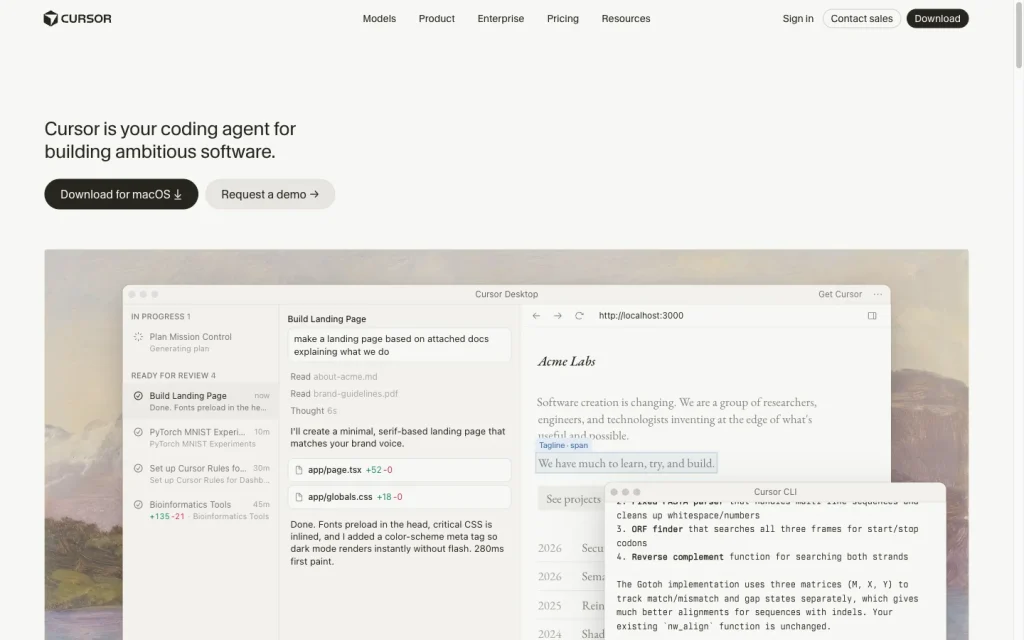
Cursor product image
cursor.com
On this page

Cursor is a VS Code-based AI coding environment for developers who want completion, scoped editing, repository-aware agents, and terminal workflows in one product. It also extends to Cloud and Background Agents, MCP integrations, a CLI, and Bugbot pull-request review.

Its strongest fit is for VS Code–oriented developers and teams that can establish clear execution and spending guardrails. Consumption limits, potential on-demand charges, automated internet-enabled agents, and notably negative user feedback on support and value are important tradeoffs.

What is Cursor?

Cursor is an AI-assisted software development environment built around a VS Code-based editor. It brings inline and multi-line completion, scoped editing, codebase indexing, project rules, and broader agent workflows into the editor, with optional CLI, cloud agent, and pull-request review services.

It suits developers who want coding assistance in a VS Code-style workspace, while the CLI extends the product to terminal, scripting, and CI use. Model choices include Cursor models and supported third-party providers through Cursor or eligible bring-your-own-key configurations.

Coding capabilities

Cursor Tab completes multiple lines and blocks of code and can move to the next suggestion across files. Inline Edit applies an instruction to selected code and can include imports and documentation. For larger repositories, Cursor positions Chat and Agent for multi-file work, while Tab and Inline Edit handle quick or focused single-file changes.

Agent tools cover directory and file reading, codebase search, grep, file search, web search and fetch, editing, deletion, terminal usage, and MCP tools. Background agents work asynchronously in isolated Ubuntu-based machines, can clone a GitHub repository to a separate branch, install packages, and access the internet.

Execution and review control

Agent-generated changes appear in a review interface with color-coded additions and deletions. Changes can be accepted or rejected by file or by individual line, and automatic checkpoints allow restoration to a previous state.

The interactive CLI requests approval or rejection before executing commands. Global or project-level permissions can allow or deny shell commands, reads, and writes, with deny rules taking precedence. Headless CLI mode proposes changes without applying them unless `--force` is used. Background Agents automatically run terminal commands and have internet access, creating prompt-injection and data-exfiltration risks that teams should manage carefully.

Developer workflow

Cursor's desktop application imports VS Code settings and works with the VS Code extension ecosystem. Its beta CLI supports interactive sessions, model selection, session resume, structured output, scripting, and CI or automation use. MCP supports local stdio, SSE and Streamable HTTP transports, with tools scoped globally or per project.

For team workflows, Cloud Agents can hand off branch changes, while Bugbot analyzes pull request diffs and provides comments and fix suggestions across GitHub, GitLab, Bitbucket, and Azure DevOps. Team administration includes centralized settings, privacy controls, usage oversight, and SSO, while enterprise controls add options such as model access controls, repository blocklists, MCP configuration, and SCIM.

Who should consider Cursor?

Cursor is a strong fit for developers and teams that want AI assistance in a VS Code–style editor, repository-aware multi-file changes, terminal or CI automation, and pull request review. It also works well for teams that need centralized billing, SSO, usage oversight, privacy enforcement, and enterprise policy controls.

Buyers should plan for consumption-based usage and potential on-demand charges. Background agents are a poor fit for strict no-network execution requirements because they have internet access and automatically run terminal commands. Developers who need a native JetBrains-first experience should also account for Cursor’s VS Code-based foundation.

Buyer scenarios

Where the product fits — and where to be careful

Developers working in VS Code-style repositories

Need
Repository-aware AI help for daily coding and multi-file changes
Why it fits
The VS Code-based editor combines completion, scoped edits, codebase indexing, project rules, multi-file agents and terminal assistance.
Watch out
Model usage is limited by plan, and on-demand usage can be billed after included usage is consumed.

Good fit

Teams automating repository and pull-request work

Need
Agent-assisted branch work, pull-request review and organizational controls
Why it fits
Cloud Agents work on separate branches, Bugbot reviews pull requests, and team controls include centralized settings, SSO and enterprise policies.
Watch out
Background Agents automatically run terminal commands and have internet access; teams with strict no-network execution needs should use caution.

Good fit with guardrails

Pros & Cons

Pros

  • VS Code-based editor with settings import and extension ecosystem access.
  • Inline completion, scoped edits, codebase indexing and multi-file Agent workflows cover varied coding tasks.
  • Diff inspection, line-level acceptance, checkpoints and configurable CLI permissions support review boundaries.
  • Cloud Agents, CLI, MCP and Bugbot extend work beyond the desktop editor.
  • Free Hobby plan and clear individual and team plan entry prices.

Cons

  • Included model usage is limited, and on-demand use can add charges after it is consumed.
  • Background Agents automatically run terminal commands and have internet access, requiring careful security boundaries.
  • User feedback is heavily negative on value for money and support.
  • The core experience is VS Code-based rather than a native JetBrains-first environment.
Editorial score breakdown

Editorial scores

Editorial score
3.5
Developer workflow
4.0

Cursor combines a VS Code-based editor, beta CLI, CI and scripting support, MCP, Cloud Agents, Background Agents, Bugbot and team administration. The core desktop experience remains VS Code-based, and CLI is labeled beta.

Coding capabilities
4.0

Cursor offers multi-line completion, scoped edits, indexing, rules, codebase search, multi-file Agent work, terminal actions and asynchronous repository agents.

Execution and review control
4.0

Diff review, file- and line-level acceptance, checkpoints, interactive command approval, CLI permission rules and headless safeguards provide strong controls. Background Agents remain an automated, internet-enabled execution path.

Usability, support & value
2.0

Accepted user feedback is predominantly negative, with particularly frequent negative mentions of value for money and support. Coding and workflow feedback is mixed.

Customer sentiment

Cursor customer reviews and sentiment

Based on 73 public customer reviews. Source mix: 59 from trustpilot.com, 9 from trustradius.com, 4 from softwareadvice.com, and 1 from gartner.com.

Customer sentiment is analyzed separately and does not determine the Reviews.vc editorial score.

73 public reviews analyzed
Positive
10%7 reviews
Mixed
16%12 reviews
Negative
74%54 reviews
Theme and findingMentionsPositiveNegative
Value for money
Buyers frequently report unexpected on-demand or premium-model charges, with limited warning or clarity about how usage and fees are applied.
46344
Coding capabilities
Agent output is often reported to ignore instructions, lose context, modify unrelated code, and require substantial rework on complex tasks.
371925
Support
Support is commonly described as automated, difficult to escalate, and rigid when handling billing disputes or refund requests.
34133
Developer workflow
Reviewers report slow, stuck, or unreliable agent runs that interrupt development and can require close manual supervision.
341422
Execution and review control
Users want stronger safeguards around agent actions, including explicit approval, tighter scope boundaries, and protection for existing code and files.
1138

Mentions count unique reviews. One review can count as both positive and negative for the same theme when it describes a mixed experience.

This analysis reflects public customer reviews we could identify and access at the time of collection; the displayed source mix may influence the patterns shown.

Review sentiment over time

PeriodnPositiveMixedNegative
2024 Q4Limited sample1010
2025 Q1Limited sample1010
2026 Q25005
2026 Q36231049

Only periods containing dated reviews are shown; gaps between labels mean no dated reviews were available for those periods.

Pricing and contract model

Cursor offers a free Hobby plan, paid individual and team plans, an India-only Start plan, and custom Enterprise pricing. Each plan includes a set amount of model usage; on-demand usage can be billed after included usage is consumed.

PlanPriceIncludes
Hobby
Free
monthly
No credit card required.
Pro
$20
per month
Individual paid plan.
Pro+
$60
per month
Individual paid plan.
Ultra
$200
per month
Individual paid plan.
Start
₹649
per month
India-only plan.
Teams Standard
$40
per user per month
Team plan.
Teams Premium
$120
per user per month
Team plan.
  • Yearly billing advertises 20% savings.
  • Unused included usage does not roll over.
  • Bugbot is usage-based.

Integrations

Documented connections and access methods for Cursor.

Messaging & collaboration

Slack Native

Developer/API

GitHub Native
GitLab Native
Azure DevOps Native
Cursor APIs and SDKs Public API

AI protocol

Model Context Protocol Protocol

Marketplace

Cursor Marketplace Other
  • Integration availability can vary by workflow and configuration.

What's new

Recent product and company updates

  • 2026-04-02

    Cursor 3

    Cursor introduced Cursor 3 and a new interface.

    Source
  • 2026-07-28

    Cursor Start in India

    Cursor introduced the India-specific Cursor Start plan.

    Source
  • 2026-08-14

    Joining SpaceX

    Cursor announced that it had been acquired by SpaceX.

    Source

FAQ

How much does Cursor cost?
Cursor has a free Hobby plan. Pro is $20 per month, Pro+ is $60 per month, Ultra is $200 per month, Teams Standard is $40 per user per month, and Teams Premium is $120 per user per month. Enterprise is custom-priced. Included model usage is limited; on-demand usage can be billed after included usage is consumed.
What coding work can Cursor handle?
Cursor offers multi-line completion, scoped Inline Edit, codebase search and indexing, rules-based context, multi-file Agent work, terminal actions, MCP tools and asynchronous Background Agents.
Which development environments does Cursor support?
Cursor is a VS Code-based desktop editor with VS Code settings import and extension compatibility. It also has a beta CLI for interactive terminal sessions, scripts, CI and automation, plus Cloud and Background Agent workflows.
How does Cursor control agent edits and commands?
Agent edits can be inspected as diffs and accepted or rejected by file or line, with checkpoints for restoration. The interactive CLI requests approval before commands run, while permissions can allow or deny shell commands, reads and writes. Background Agents automatically run terminal commands and have internet access.
Review transparency Corrections policy
Change history
  1. 2026-09-18 Initial publication First published version of this review.
32 sources analyzed
  1. Cursor Pricing cursor.com
  2. Quickstart docs.cursor.com
  3. Agent tools docs.cursor.com
  4. Agent review docs.cursor.com
  5. Background Agent docs.cursor.com
  6. Cloud Agents docs.cursor.com
  7. Cursor 3 cursor.com
  8. Cursor Start in India cursor.com
  9. Joining SpaceX cursor.com
  10. Bugbot prod.cursor.com

Showing 10 of 32 sources · 22 additional sources analyzed

Feedback on this article

Was this review helpful?

Private editorial feedback. It does not change product ratings or rankings.

Rate Cursor

Rate your experience
  • Developer workflow
  • Coding capabilities
  • Execution and review control
  • Usability, support & value