
Salesforge logo

Salesforge

Salesforge combines email and LinkedIn outreach with AI personalization, sender controls, CRM connections, and public plans from $40 per month.

Editorial score

4.0 /5
How we scored it

Is Salesforge worth it?

Nick Oscar
Editor, Reviews.vc · Updated August 22, 2026
Good For

Native email and LinkedIn sequences support a broad set of actions, conditional branches, and scheduling controls.

Caution

Native outreach coverage is centered on email and LinkedIn; a built-in dialer or calling-sequence workflow is not established.

Salesforge product image
salesforge.ai
On this page

Salesforge is an outbound sales execution platform for teams running email and LinkedIn campaigns from a single workflow. Its strengths are multichannel sequencing, AI-assisted personalization and replies, and an unusually deep set of sender-health controls. The trade-off is channel scope: buyers who need native calling or SMS execution will have to validate another tool or workflow.

What is Salesforge?

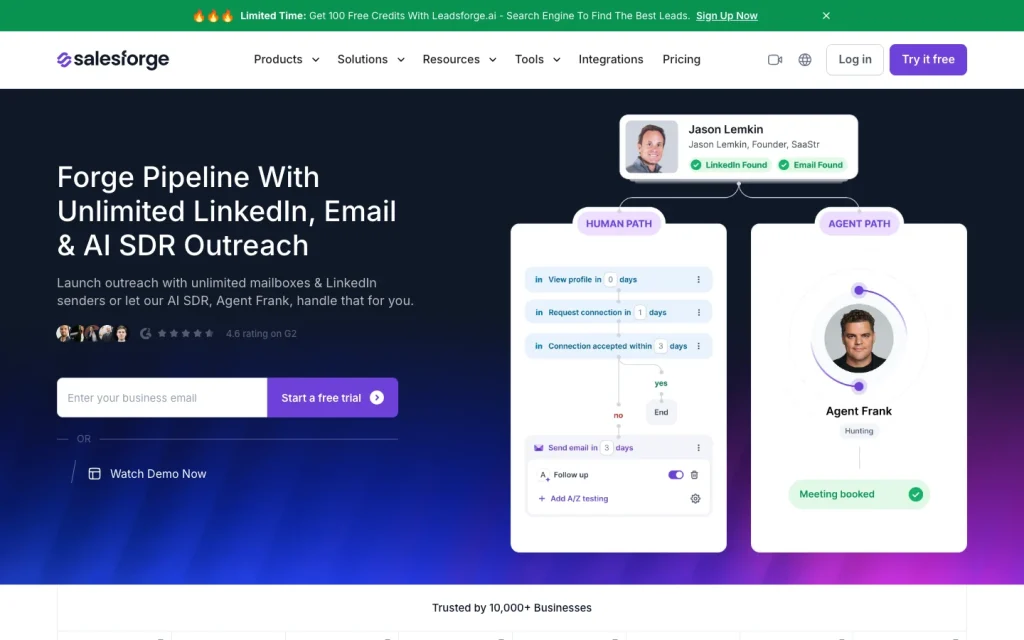
Salesforge is a sales execution and outbound outreach platform focused on email and LinkedIn. It brings together sequences, conditional multichannel flows, follow-ups, reply management, AI personalization, campaign tracking, and integrations with CRM and workflow tools. Leads can come from existing contacts, CSV files, Google Sheets, or Leadsforge.

Agent Frank is a separately priced AI SDR option for automated prospecting, contact search, and email reply and meeting management workflows. It can operate in autopilot or co-pilot modes.

Channels and sequence workflow

Salesforge provides native email and LinkedIn actions in the same sequence. Email steps include threaded follow-ups, templates, variables, HTML editing, spam checking, A/B testing, scheduling, and opt-out controls. LinkedIn actions include connection requests, direct messages, InMail, profile views, follows, and post likes.

Teams can mix channels in a single flow, then add delays, conditional branches, time-zone and sending-window controls, allocation priorities, and company-level multithreading limits. Native SMS and calling capabilities are not documented in the available product materials.

Personalization and deliverability

Personalization tools include templates, custom variables, Autospintax variations, LinkedIn-profile-based AI generation, multilingual output, and a file-based knowledge base. For replies, co-pilot mode lets a person approve or edit AI suggestions, while autopilot can continue conversations toward a sequence goal.

Salesforge also has a substantial sender-protection toolset: validation, Bounce Shield, ESP matching, mailbox-capacity-aware sending, plain-text sending, tracking controls, spam checking, warm-up, placement testing, mailbox-health monitoring, blacklist monitoring, DNS and MX checks, and unsubscribe controls.

Integrations and analytics

Salesforge connects with CRM, data, workflow, and email infrastructure tools. Named connections include Salesforce, HubSpot, Clay, Persana AI, Slack, Zapier, webhooks, and the Salesforge API. It also provides a CLI and an MCP server for compatible AI assistants.

HubSpot can synchronize contacts and activities, map Primebox labels, sync do-not-contact status, and create deals from selected reply labels and pipeline stages. Reporting covers engagement and campaign activity such as opportunities, opens, clicks, bounces, unsubscribes, replies, and opt-out rates. Full revenue attribution, forecasting, and advanced experimentation analytics are not supported here.

Who Salesforge fits

Salesforge is a strong fit for outbound SDR and BDR teams, founders and solo sellers, agencies, and sales operations teams that need coordinated cold email and LinkedIn campaigns. It works well for everyone from one-person teams to larger organizations, and the Growth plan supports unlimited users, workspaces, mailboxes, and LinkedIn senders, subject to fair-use limits.

Choose it when multichannel sequencing, AI-assisted replies, multiple sender accounts, CRM synchronization, and deliverability infrastructure are core requirements. Teams that need a native dialer or calling workflow should consider alternatives, since the available materials emphasize email and LinkedIn rather than built-in calling steps.

Buyer scenarios

Where the product fits — and where to be careful

Coordinated cold email and LinkedIn outreach

Need
Run multichannel outbound campaigns with sender infrastructure and workflow controls.
Why it fits
Outbound SDR and BDR teams, founders, agencies, and sales-operations teams can coordinate email and LinkedIn campaigns, manage multiple senders, use AI-assisted replies, and synchronize CRM activity.
Watch out
Salesforge’s established execution channels are email and LinkedIn; the reviewed materials do not establish a native dialing or calling-sequence workflow.

Strong fit when email and LinkedIn are the core outbound motion.

Scaled outbound operations

Need
Scale outreach across teams, sender accounts, CRM workflows, and operational tools.
Why it fits
Growth supports unlimited users, workspaces, mailboxes, and LinkedIn senders, while its CRM, webhook, API, CLI, and MCP options support more connected operations.
Watch out
The available evidence supports engagement reporting but does not establish full revenue attribution, forecasting, or advanced experimentation analytics.

Good fit for teams prioritizing coordinated execution and extensibility over advanced revenue analytics.

Pros & Cons

Pros

  • Native email and LinkedIn sequences support a broad set of actions, conditional branches, and scheduling controls.
  • Strong sender-protection toolkit, including validation, warm-up, placement testing, mailbox monitoring, and reputation checks.
  • AI personalization, knowledge-base grounding, and co-pilot or autopilot reply workflows extend campaign execution.
  • CRM, workflow, API, webhook, CLI, and MCP options support connected outbound operations.
  • Public pricing, a 14-day trial, and monthly or annual subscription choices make initial evaluation straightforward.

Cons

  • Native outreach coverage is centered on email and LinkedIn; a built-in dialer or calling-sequence workflow is not established.
  • Available reporting covers engagement and activity, but full revenue attribution, forecasting, and advanced experimentation are not established.
  • Agent Frank is separately priced at $499 per month billed quarterly.
  • User feedback includes some negative comments around support, automation, ease of use, and value for money.
Editorial score breakdown

Editorial scores

Editorial score
4.0
Deliverability controls
4.0

Salesforge provides extensive sender controls across validation, bounce protection, ESP matching, warm-up, placement testing, mailbox health, blacklist monitoring, and reputation checks. User feedback that mentions deliverability is positive in the supplied aggregate.

Integrations & analytics
4.0

Verified CRM and workflow connections, API and webhooks, CLI, and MCP support make Salesforge highly extensible. Engagement reporting is broad, though full revenue attribution and forecasting are not established.

Channel coverage
3.0

Salesforge offers substantial native execution across email and LinkedIn, with mixed sequences and numerous LinkedIn actions. Native calling and SMS execution are not established.

Sequences & personalization
5.0

Conditional multichannel flows, branching, A/B variants, AI personalization, knowledge-base grounding, reply modes, and team controls create a deep outbound automation workflow. User reviews show both positive and negative sequence-automation feedback.

Customer sentiment

Salesforge customer reviews and sentiment

Based on 25 public customer reviews. Source mix: 25 from trustpilot.com.

Customer sentiment is analyzed separately and does not determine the Reviews.vc editorial score.

25 public reviews analyzed
Positive
60%15 reviews
Mixed
12%3 reviews
Negative
28%7 reviews
Theme and findingMentionsPositiveNegative
Support
Support is often described as responsive, helpful, and quick to resolve questions or issues, though some reviewers report slow or ineffective help when technical problems persist.
17136
Sequence automation
Reviewers value flexible, reliable email and multichannel automation that saves time and supports scaled outreach, although some report sequencing bugs and follow-up scheduling problems.
1284
Ease of use
Many users find campaign setup, sequence management, and onboarding intuitive, but a few report setup friction, technical issues, or workflow changes that make tasks harder.
1074
Email deliverability
Deliverability is consistently praised as strong and reliable, supported by features such as warm-up, bounce protection, ESP matching, and contact validation.
770
Value for money
Value perceptions are mixed: some users consider the service fairly priced, while others cite billing, cancellation, refund, and unwanted-contact charges as making it poor value.
734

Mentions count unique reviews. One review can count as both positive and negative for the same theme when it describes a mixed experience.

This analysis reflects public customer reviews we could identify and access at the time of collection; the displayed source mix may influence the patterns shown.

Review sentiment over time

PeriodnPositiveMixedNegative
2025 Q35410
2026 Q19801
2026 Q26123
2026 Q35203

Only periods containing dated reviews are shown; gaps between labels mean no dated reviews were available for those periods.

Pricing and contract model

Salesforge publishes monthly prices for Pro, Growth, and Agent Frank, plus a 14-day free trial. Monthly or annual subscriptions are available, annual subscriptions receive two months free, and no contract commitment is required.

PlanPriceIncludes
Pro
$40
month, billed monthly
Plan for solopreneurs and people trying Salesforge.
Growth
$80
month, billed monthly
Plan for sales professionals and growing businesses.
Agent Frank
$499
month, billed quarterly
Separately priced AI SDR option.
  • Exact annual dollar amounts for Pro and Growth are not included in the retrieved pricing-page body.
  • The free trial includes 50 contacts, 100 emails, 50 email-validation credits, 50 personalization credits, and 100 social-action credits.

Integrations

Documented connections and access methods for Salesforge.

CRM

Salesforce Native
HubSpot Native

Automation

Zapier Via automation

Messaging & collaboration

Slack Native

Developer/API

Salesforge API, webhooks, and CLI Public API

AI protocol

Forge MCP Server Protocol

Other

Clay Native
Persana AI Native
  • Salesforge lists connectivity with 1,000+ apps and products on its integrations page.

What's new

Recent product and company updates

  • 2026-01-16

    Salesforge–Clay integration launched

    Salesforge launched its Clay integration, allowing enriched contacts to move into email and LinkedIn campaigns.

    Source
  • 2025-03-06

    Persana AI–Salesforge integration announced

    Persana AI announced its Salesforge integration for sending enriched lead data into personalized outreach workflows.

    Source

FAQ

How much does Salesforge cost?
Public monthly prices are $40 for Pro and $80 for Growth. Agent Frank is listed at $499 per month billed quarterly, and Salesforge offers a 14-day free trial.
Which outreach channels does Salesforge support?
Salesforge supports email and LinkedIn outreach, including mixed sequences that combine the two channels.
Can Salesforge automate multichannel sequences?
Yes. Sequences can combine email and LinkedIn actions, delays, conditional branches, A/B variants, time-zone controls, and company-level multithreading limits.
What deliverability controls does Salesforge include?
Its feature set includes contact validation, Bounce Shield, ESP matching, spam checking, warm-up, placement tests, mailbox-health monitoring, blacklist monitoring, DNS and MX checks, and opt-out controls.
Does Salesforge integrate with CRM and workflow tools?
Salesforge lists connections with tools including Salesforce, HubSpot, Clay, Slack, Zapier, webhooks, and its API. It also offers an MCP server for compatible AI assistants.
Who is Salesforge best suited for?
It fits outbound SDR and BDR teams, founders, solo sellers, agencies, and sales-operations teams running coordinated cold email and LinkedIn outreach. Teams that need a native dialer should look closely at that gap.
Review transparency Corrections policy
Change history
  1. 2026-08-22 Initial publication First published version of this review.
24 sources analyzed
  1. Salesforge salesforge.ai
  2. Salesforge Pricing salesforge.ai
  3. Sequence Building help.salesforge.ai
  4. Salesforge Multichannel help.salesforge.ai
  5. How the Forge Stack Works End-to-End help.salesforge.ai
  6. Salesforge Integrations salesforge.ai
  7. HubSpot-Salesforge Integration help.salesforge.ai
  8. Salesforge Clay Integration salesforge.ai
  9. Persana and Salesforge Integration persana.ai
  10. Salesforge MCP Server: Connect with AI Assistants help.salesforge.ai

Showing 10 of 24 sources · 14 additional sources analyzed

Feedback on this article

Was this review helpful?

Private editorial feedback. It does not change product ratings or rankings.

Rate Salesforge

Rate your experience
  • Deliverability controls
  • Integrations & analytics
  • Channel coverage
  • Sequences & personalization