
VEED logo

VEED

VEED is a browser-based video editor with transcript editing, captions, AI clips, collaboration, and social export tools.

Editorial score

3.8 /5
How we scored it

Is VEED worth it?

Nick Oscar
Editor, Reviews.vc · Updated October 10, 2026
Good For

Timeline and transcript-based editing combine conventional cuts with speech-led cleanup.

Caution

Free exports are capped at 720p and include a VEED watermark.

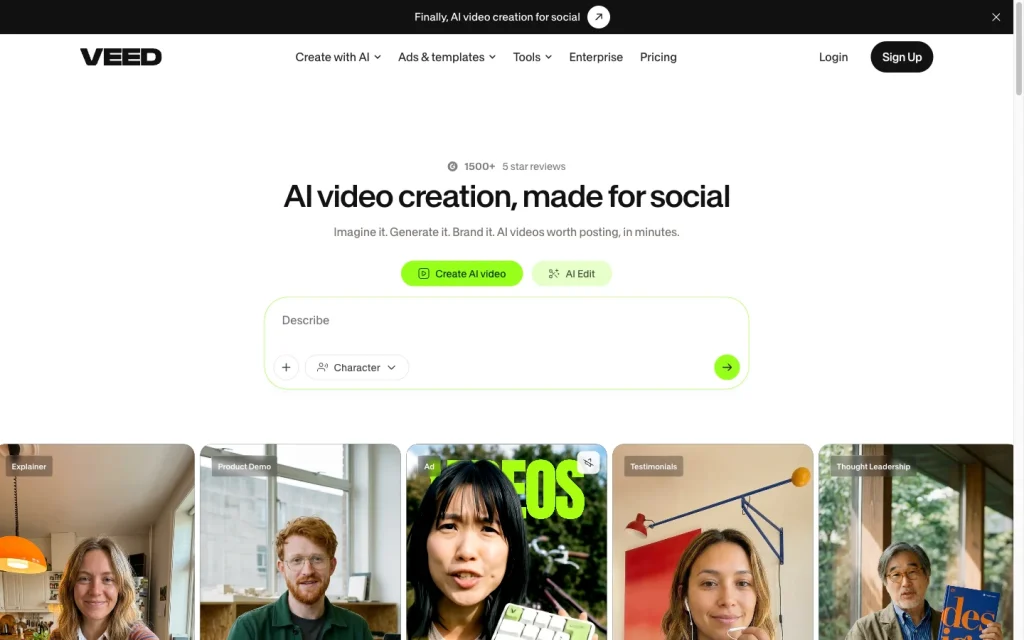
VEED product image
veed.io
On this page

VEED is a browser-based video platform for editing uploaded footage, creating captions, repurposing long videos into short clips, and collaborating on social, marketing, training, sales, and internal content projects. Its mix of timeline and transcript editing, speech cleanup, subtitle tools, social formatting, and cloud workspaces makes it particularly practical for creators and small teams. Buyers should weigh the export limits on Free plans, the English-only Magic Cut, flat collaborator access, and restricted project portability.


What is VEED?

VEED is a cloud-based video creation and editing platform for uploaded footage and AI-assisted video work. It combines timeline- and transcript-based editing with captions, clipping, collaboration, asset management, templates, and optional synthetic video tools. Its core audiences include marketers, founders, creators, small teams, and businesses producing social, marketing, training, sales, and internal communications video.

Editing capabilities

VEED supports trimming, cropping, arranging clips on a timeline, and adding text, subtitles, and music. Its transcript editor can remove the matching footage when text is deleted, while Magic Cut can remove silences, filler words, repeated mistakes, pauses, and presumed bad takes; Magic Cut is English-only. Clean Audio targets hum, wind, static, traffic, and echo, while enhancing speech and normalizing volume. Background removal and eye-contact correction are also available for existing footage.

Captions and repurposing

Automatic subtitles can be generated for a selected clip or an entire project, then edited, styled, or paired with uploaded SRT and VTT files. Subtitle translation is available in 125+ languages and uses AI credits. AI Clips identifies highlights in long-form video, adds subtitles, auto-frames speakers, removes filler words and silences, and formats outputs for TikTok, Instagram Reels, and YouTube Shorts. Generated clips remain editable and can be sent to the main editor for further caption customization.

Export and project workflow

Projects can be organized in spaces and folders, duplicated, converted into templates, shared by link, resized for social, and downloaded after export. Workspace asset libraries retain uploaded and generated assets for reuse, and collaborators can leave timestamped feedback. Standard edited-project output is MP4. Workflow constraints matter for teams: projects cannot move between VEED accounts or workspaces, editable project interchange is not supported, and collaborators receive the same editing ability and workspace project access.

Who VEED fits

VEED is a strong fit for social-first creators and marketers who need captioned, branded short-form video, and for speech-heavy content such as podcasts, interviews, webinars, coaching, and education. Small teams can benefit from Spaces, shared assets, templates, Brand Kits, and collaboration. It’s less suitable for teams that need role-based permissions, editable project interchange, or project transfers between workspaces. The Free plan is not a long-term fit for watermark-free production because Free exports are 720p and include a VEED watermark.

Buyer scenarios

Where the product fits — and where to be careful

Social-first creators and marketers

Need
Turn existing footage into captioned, branded short-form social video.
Why it fits
Timeline and transcript-based editing, Clean Audio, automatic subtitles, AI Clips, auto-framing, social resizing, and Brand Kits support fast production for social channels.
Watch out
Free exports are 720p with a watermark, and Magic Cut is English-only.

Strong fit

Small marketing and internal-content teams

Need
Create and review marketing, training, sales, or internal videos in a shared workspace.
Why it fits
Spaces, asset libraries, templates, share links, timestamped feedback, captions, and speech-focused cleanup suit recurring internal-content work.
Watch out
Collaborators have flat editing access, and projects cannot move between accounts or workspaces.

Fit with workflow limits

Pros & Cons

Pros

  • Timeline and transcript-based editing combine conventional cuts with speech-led cleanup.
  • Automatic captions, subtitle styling, translation, AI Clips, and social resizing support short-form repurposing.
  • Clean Audio, background removal, and eye-contact correction extend the toolkit for existing footage.
  • Spaces, asset libraries, templates, share links, and timestamped feedback support small teams.
  • Free, Creator, Pro, Studio, and Enterprise plan restrictions are clearly differentiated by export resolution and watermarking.

Cons

  • Free exports are capped at 720p and include a VEED watermark.
  • Projects cannot move between accounts or workspaces, and editable-project interchange is not listed.
  • Collaborators have flat editing access rather than role-based permissions.
  • Magic Cut is English-only.
  • User feedback trends negative on support and value for money.
Editorial score breakdown

Editorial scores

Editorial score
3.8
Editing capabilities
4.0

VEED combines timeline and transcript-based editing with silence and filler removal, Clean Audio, background removal, and eye-contact correction. Magic Cut's English-only limitation keeps the feature set short of the highest tier.

Captions and repurposing
4.0

Automatic editable captions, SRT and VTT support, translation marketed in 125+ languages, AI Clips, auto-framing, social formatting, templates, and Brand Kits provide substantial repurposing coverage.

Export and project workflow
4.0

Spaces, reusable assets, sharing, timestamped feedback, social resizing, and MP4 export create a capable cloud workflow, while account-to-account transfer limits and flat collaborator access constrain portability and control.

Usability, support & value
3.0

User feedback is strongly positive on ease of use, but value-for-money and support mentions trend negative, producing a mixed usability, support, and value picture.

From our complete category comparison

VEED alternatives

Category scores use the linked comparison rubric and can differ from a product’s overall review score.

See the full comparison
VEED
3.8/5
Reviewed here
Best for
Creators, marketers, and small teams producing captioned, branded social, training, sales, and internal videos in a browser.
Key tradeoff
Free exports are limited to 720p and include a VEED watermark.
Best for
Professional editors, filmmakers, agencies, and post-production teams that need detailed control, collaboration, and reliable project handoff.
Key tradeoff
Its crowded interface and extensive toolset create a meaningful learning curve for new or occasional editors.
Best for
Podcasters, interview producers, and talking-head creators who want to edit spoken content quickly through a transcript and repurpose it into captioned clips.
Key tradeoff
Media minutes and AI credits are metered, and unused allowances do not roll over.
Best for
Beginner to intermediate creators and small content teams producing fast, template-driven social videos from mobile or desktop.
Key tradeoff
Premium assets and some export settings, including certain no-watermark and high-resolution options, may require an eligible plan.
ProductCategory scoreBest forKey tradeoff
VEEDReviewed here
3.8/5Creators, marketers, and small teams producing captioned, branded social, training, sales, and internal videos in a browser.Free exports are limited to 720p and include a VEED watermark.
Adobe Premiere
3.8/5Professional editors, filmmakers, agencies, and post-production teams that need detailed control, collaboration, and reliable project handoff.Its crowded interface and extensive toolset create a meaningful learning curve for new or occasional editors.
Descript
3.8/5Podcasters, interview producers, and talking-head creators who want to edit spoken content quickly through a transcript and repurpose it into captioned clips.Media minutes and AI credits are metered, and unused allowances do not roll over.
CapCut
3.5/5Beginner to intermediate creators and small content teams producing fast, template-driven social videos from mobile or desktop.Premium assets and some export settings, including certain no-watermark and high-resolution options, may require an eligible plan.
Customer sentiment

VEED customer reviews and sentiment

Based on 19 public customer reviews. Source mix: 13 from trustpilot.com, 5 from softwareadvice.com, and 1 from gartner.com.

Customer sentiment is analyzed separately and does not determine the Reviews.vc editorial score.

19 public reviews analyzed
Positive
58%11 reviews
Mixed
11%2 reviews
Negative
32%6 reviews
Theme and findingMentionsPositiveNegative
Ease of use
Users often find the editor intuitive and straightforward, though novice navigation can be counterintuitive.
1192
Editing quality
The feature set supports polished edits, subtitles, effects, and branding, but some users report glitches and unreliable tools.
753
Value for money
Some see the product as affordable, but pricing feels poor when paid credits, refunds, or reliability do not meet expectations.
725
Support
Support is criticized as slow and unhelpful, with unresolved account issues, refund requests, and referral disputes.
404
Export and project workflows
Encoding and media workflows can be useful, but inaccessible projects and platform instability can interrupt production.
312

Mentions count unique reviews. One review can count as both positive and negative for the same theme when it describes a mixed experience.

This analysis reflects public customer reviews we could identify and access at the time of collection; the displayed source mix may influence the patterns shown.

Pricing and contract model

VEED has Free, Creator, Pro, Studio, and Enterprise plans with per-seat billing. Subscriptions can be monthly or annual and auto-renew by default.

PlanPriceIncludes
Free
$0
Free
Free exports are limited to 720p and include a VEED watermark.
Creator
$147 per user
yearly
Creator includes 6,000 credits on the captured annual pricing view and exports up to 1080p.
Pro
$265 per user
yearly
Pro includes 30,000 credits on the captured annual pricing view and exports up to 4K.
Studio
$465 per user
yearly
Studio includes 180,000 credits on the captured annual pricing view and exports up to 4K.
  • Pricing view lists Creator at $12 per user per month billed yearly, Pro at $22, and Studio at $39.
  • Unused AI credits expire monthly on monthly plans and reset annually on annual plans.
  • Cancellation stops future charges but does not produce a refund.

Integrations

Documented connections and access methods for VEED.

Developer/API

VEED API Public API

AI protocol

OpenEdit Protocol

Other

Subtitle API early-access platforms Embedded
  • The listed connections center on APIs and protocol-enabled workflows rather than a broad traditional app marketplace.

What's new

Recent product and company updates

  • 2026-05-18

    VEED launches Subtitle API

    VEED launched its Subtitle API with automatic word highlighting and localization across 100+ languages.

    Source
  • 2026-08-19

    OpenEdit by VEED

    An OpenEdit update added Fabric integration, generated assets, longer-video handling, motion graphics, cutting, reframing, and layering.

    Source

FAQ

How much does VEED cost?
VEED offers Free, Creator, Pro, Studio, and Enterprise plans. The annual pricing view lists Creator at $147 per user per year, Pro at $265 per user per year, Studio at $465 per user per year, and Enterprise at custom pricing.
Can VEED edit video from a transcript?
Yes. Transcript-based editing can remove corresponding footage when text is deleted, and it can remove silences, filler words, and unwanted sections.
Can VEED create and translate captions?
VEED can generate subtitles for selected clips or a full project, let users edit and style them, accept SRT or VTT uploads, and market subtitle translation in 125+ languages. Translation uses AI credits and availability differs from transcription availability.
What export limits does VEED have?
Standard edited-project export is MP4. Free exports are limited to 720p and carry a VEED watermark; Creator exports up to 1080p; Pro, Studio, and Enterprise export up to 4K.
Review transparency Corrections policy
Change history
  1. 2026-10-10 Comparison Added alternatives comparison from Best AI Video Editors.
  2. 2026-09-18 Initial publication First published version of this review.
22 sources analyzed
  1. VEED Video Editor veed.io
  2. VEED Pricing veed.io
  3. VEED API Documentation api.veed.io
  4. VEED launches Subtitle API veed.io
  5. OpenEdit by VEED veed.io
  6. How to add subtitles to your video automatically support.veed.io
  7. How to use VEED's Clips feature support.veed.io
  8. How VEED's dashboard works support.veed.io
  9. How to export your project support.veed.io
  10. How to add a collaborator support.veed.io

Showing 10 of 22 sources · 12 additional sources analyzed

Feedback on this article

Was this review helpful?

Private editorial feedback. It does not change product ratings or rankings.

Rate VEED

Rate your experience
  • Editing capabilities
  • Captions and repurposing
  • Export and project workflow
  • Usability, support & value