
Lindy logo

Lindy

Lindy combines an AI work assistant with a flexible builder for multi-step, trigger-based agent workflows.

Editorial score

3.8 /5
How we scored it

Is Lindy worth it?

Nick Oscar
Editor, Reviews.vc · Updated July 26, 2026
Good For

Broad workflow builder with triggers, branching, parallel actions, timers, exception handling, testing, and templates.

Caution

Credit consumption varies by model, complexity, premium actions, and run duration; unused credits do not roll over.

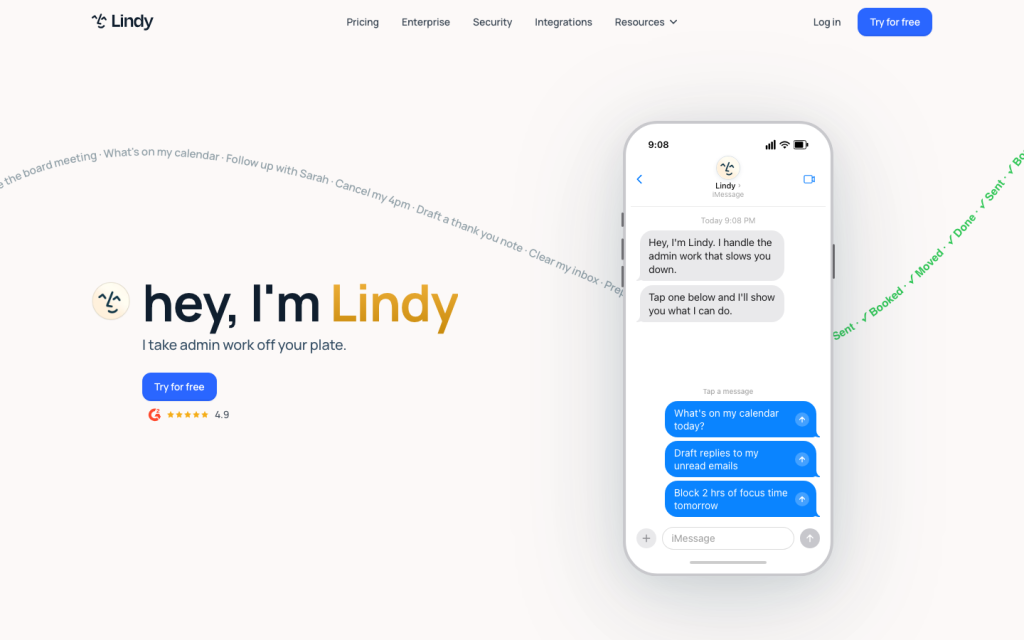
Lindy product image
lindy.ai

Lindy is an AI work assistant and no-/low-code platform for building trigger-based agent workflows. It combines a ready-made assistant for inbox, calendar, meeting, and follow-up tasks with a visual builder for multi-step automations, code, webhooks, and connected apps. Its technical scope is substantial, but prospective buyers should closely test reliability and credit consumption: the available user-review aggregate is predominantly negative on value, support, and reliability.


What is Lindy?

Lindy is an AI work assistant and no-/low-code AI agent workflow platform. Its ready-made assistant handles email, calendars, meetings, scheduling, follow-ups, messaging, and ad hoc delegation, while custom agents support multi-step workflows built with integrations, AI steps, memory, logic, and code.

Typical assistant tasks include triaging and prioritizing email, drafting replies, scheduling and preparing for meetings, creating notes and follow-ups, and accepting delegated work through iMessage, SMS, Slack, email, or the web app.

Automation capabilities

Lindy supports both event-driven and scheduled workflows. Available triggers include new emails, new calendar events, scheduled times, chat messages, and webhooks. Builders can sequence actions, run actions simultaneously, route with natural-language conditions, process lists in parallel, and use timers, delays, and waits.

For advanced workflows, Lindy supports Python and JavaScript steps, authenticated HTTP requests, browser-based Computer Use, task monitoring, and observability data. Agent Builder enables prompt-to-agent creation, while persistent memory and integrations extend agents across multi-step work. Lindy advises using deterministic actions and conditions where possible because AI agents can cost more and be less reliable.

Workflow integrations

Lindy states that it connects with hundreds of apps. Named examples include Gmail, Google Calendar, Google Docs, Google Drive, Google Sheets, HubSpot, LinkedIn, Microsoft Outlook, Microsoft Teams, Notion, Salesforce, Slack, Telegram, Twilio, YouTube, and Zoom.

For systems outside the connector set, inbound webhooks can start workflows, HTTP Request can call external APIs, Python and JavaScript can add custom logic, and Computer Use can operate systems without an available API or integration. This gives technical teams several options for extending workflows beyond prebuilt connections.

Who should consider Lindy?

Lindy is best suited to professionals and teams that want AI assistance for inboxes, calendars, meetings, follow-ups, sales, support, operations, research, and custom business processes. Templates and visual workflows help non-programmers get started, while webhooks, HTTP, code, model calls, and observability give advanced builders more control.

Enterprise buyers can access shared usage, onboarding, dedicated support, SSO, SCIM, audit logs, custom company context, and HIPAA support with a signed BAA. It is a weaker fit for organizations that only need deterministic, inexpensive, high-volume routing or cannot actively monitor credit usage.

Buyer scenarios

Where the product fits — and where to be careful

Professional executive assistant workflows

Need
Reduce inbox, scheduling, meeting-preparation, and follow-up work.
Why it fits
The ready-made assistant and custom agents support email triage, reply drafting, scheduling, meeting preparation, notes, and follow-ups.
Watch out
Usage consumes credits, and agents pause when credits are exhausted.

Good fit for professionals and heavy individual operators willing to monitor usage.

Custom team automations

Need
Build multi-step business workflows across productivity, CRM, support, and custom systems.
Why it fits
Visual workflows, templates, integrations, webhooks, HTTP, code, Computer Use, and observability support both no-code and technical implementation.
Watch out
AI agents can be more expensive and less reliable than deterministic actions; test critical workflows before broad deployment.

Strong fit for teams that need flexible AI-assisted automation rather than only fixed routing.

Pros & Cons

Pros

  • Broad workflow builder with triggers, branching, parallel actions, timers, exception handling, testing, and templates.
  • AI agents can use integrations, memory, logic, code, HTTP requests, and browser-based Computer Use.
  • Supports scheduled, event-driven, and webhook-triggered workflows.
  • Public plans include a 7-day trial and monthly tiers for different usage levels.

Cons

  • Credit consumption varies by model, complexity, premium actions, and run duration; unused credits do not roll over.
  • Agents pause when credits are exhausted.
  • Lindy notes that AI agents can be more expensive and less reliable than deterministic actions.
  • The user-review aggregate is heavily negative on value for money, support, and reliability.
Editorial score breakdown

Editorial scores

Editorial score
3.8
Automation coverage
5.0

Lindy supports event and schedule triggers, sequential and parallel execution, conditions, looping, timers, webhooks, code, HTTP requests, exception handling, testing, task monitoring, and observability.

AI capabilities
4.0

The platform provides prompt-to-agent creation, AI steps, persistent memory, integrations, code, Computer Use, and Agent Builder, although its own guidance notes that agent behavior can be less reliable than deterministic actions.

Workflow & integrations
4.0

Lindy connects with hundreds of apps and provides common productivity, CRM, messaging, and data connectors alongside inbound webhooks, outbound HTTP requests, Python, JavaScript, and Computer Use.

Value for money
2.0

Pricing is public, but usage is credit-based, credits do not roll over, agents pause at exhaustion, and the user-review aggregate is strongly negative on value for money.

Customer sentiment

Lindy customer reviews and sentiment

Based on 37 public customer reviews. Source mix: 35 from trustpilot.com, and 2 from capterra.com.

Customer sentiment is analyzed separately and does not determine the Reviews.vc editorial score.

37 public reviews analyzed
Positive
5%2 reviews
Mixed
14%5 reviews
Negative
81%30 reviews
Theme and findingMentionsPositiveNegative
Value for money
Buyers frequently describe poor value because credits can be consumed quickly or unpredictably, while several also report disputed or continued charges and difficult cancellation.
28227
Support
Support is commonly described as hard to reach or slow to resolve billing, cancellation, and technical problems, though a small number of reviewers report helpful outcomes.
20317
Reliability
Reviewers report unreliable automations and integrations, including missed or misrouted email actions, duplicate triggers or messages, failures, and long delays.
13013
AI capabilities
The AI is seen as useful for some basic automation, but reviewers report that it can misunderstand instructions, hallucinate, and struggle with more complex tasks or external services.
1037
Workflow building
Workflow building can enable customizable task automation, but reviewers describe a steep or unintuitive setup process and workflows that can behave unpredictably or require manual correction.
845

Mentions count unique reviews. One review can count as both positive and negative for the same theme when it describes a mixed experience.

This analysis reflects public customer reviews we could identify and access at the time of collection; the displayed source mix may influence the patterns shown.

Review sentiment over time

PeriodnPositiveMixedNegative
2025 Q45014
2026 Q16006
2026 Q28017
2026 Q3Limited sample1001

Only periods containing dated reviews are shown; gaps between labels mean no dated reviews were available for those periods.

Pricing and contract model

Lindy publishes monthly Plus, Pro, and Max plans, plus custom Enterprise pricing. New accounts receive a 7-day trial with full Pro features.

PlanPriceIncludes
Plus
$49.99
per month
Plan for professionals getting started.
Pro
$99.99
per month
Plan for heavier use, including daily delegation, multiple inboxes, research, meetings, and ad-hoc tasks.
Max
$199.99
per month
Plan for very heavy use.
  • Tasks consume credits based on model intelligence, task complexity, premium actions, and agent duration.
  • Unused credits do not roll over, and agents pause when credits are exhausted.
  • Plus has no long-term contract; users can cancel in account settings and retain access through the end of the billing period.
  • Not publicly disclosed: Enterprise.

Integrations

Documented connections and access methods for Lindy.

CRM

Salesforce Native
HubSpot Native

Messaging & collaboration

Slack Native

Developer/API

Webhooks Public API
HTTP Request Public API
Python and JavaScript Native

Productivity suite

Gmail Native
Google Calendar Native

Browser extension

Computer Use Native
  • Lindy states that it connects with hundreds of apps.

Recent signals

Product and company changes worth checking

  • 2025-08-04

    Lindy 3.0

    Lindy 3.0 introduced Agent Builder, Autopilot, and Team Accounts.

    Source
  • 2026-02-10

    Lindy Assistant launch

    Lindy Assistant added inbox triage, reply drafting, meeting preparation, scheduling, and follow-up workflows.

    Source

FAQ

How much does Lindy cost?
Lindy lists Plus at $49.99 per month, Pro at $99.99 per month, Max at $199.99 per month, and Enterprise with custom pricing. It also offers a 7-day trial with full Pro features.
What can Lindy automate?
Lindy supports AI workflows for data processing, document management, onboarding, invoice processing, inventory management, quality control, compliance monitoring, and multi-step processes. Its assistant also supports email, calendars, meetings, scheduling, and follow-ups.
How does Lindy connect to other systems?
Lindy states that it connects with hundreds of apps and names tools such as Gmail, Google Calendar, Slack, Notion, Salesforce, HubSpot, and Google Sheets. It also supports inbound webhooks, outbound HTTP requests, Python, JavaScript, and Computer Use.
Who is Lindy best for?
Lindy fits individual professionals, founders, executives, sales, support, and operations teams, as well as businesses building custom automations. It is less suitable for buyers seeking only deterministic, low-cost, high-volume routing.
Change notes Corrections policy
  1. 2026-07-26 Initial publication First published version of this review.
Sources analyzed (20)
  1. Lindy Documentation docs.lindy.ai accessed 2026-07-26
  2. Create an Agent docs.lindy.ai accessed 2026-07-26
  3. Actions docs.lindy.ai accessed 2026-07-26
  4. AI Agents docs.lindy.ai accessed 2026-07-26
  5. Pricing docs.lindy.ai accessed 2026-07-26
  6. Lindy Pricing www.lindy.ai accessed 2026-07-26
  7. Lindy Integrations www.lindy.ai accessed 2026-07-26
  8. Webhooks docs.lindy.ai accessed 2026-07-26
  9. Lindy 3.0 www.lindy.ai accessed 2026-07-26
  10. Lindy Assistant www.lindy.ai accessed 2026-07-26

Showing 10 of 20 sources · 10 additional sources analyzed

Leave Review
Rate your experience
  • Automation coverage
  • AI capabilities
  • Workflow & integrations
  • Value for money