
Avoma logo

Avoma

Avoma is an AI meeting-notes platform with flexible recording, CRM handoffs, exports, and sales-focused workflow add-ons.

Editorial score

4.0 /5
How we scored it

Is Avoma worth it?

Nick Oscar
Editor, Reviews.vc · Updated September 18, 2026
Good For

Multiple capture routes: bot, bot-free/native, cloud recordings, desktop, mobile, and uploads.

Caution

In-person single-channel capture can reduce speaker identification, transcription, and note quality.

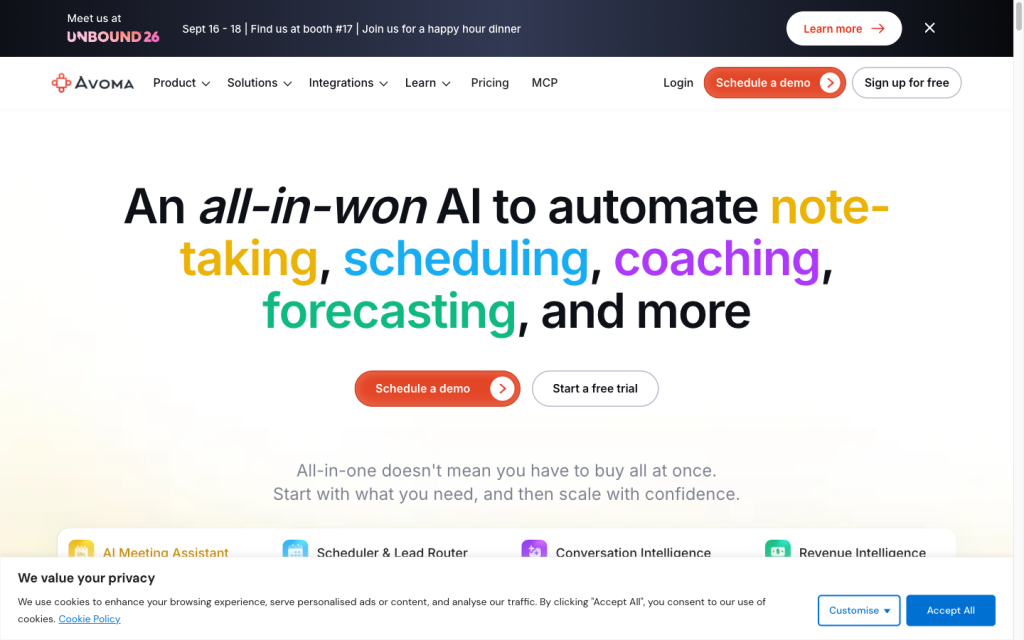
Avoma product image
avoma.com
On this page

Avoma is an AI meeting-notes platform for customer-facing teams that need flexible meeting capture, transcription, structured follow-up, and CRM handoffs. It stands out for its broad recording options, intuitive note workflows, exports, and integrated sales tooling, while its deeper coaching and revenue capabilities are paid add-ons. It’s especially compelling when a smaller group of people records meetings for a larger audience of free viewers and collaborators.

What is Avoma?

Avoma is a meeting management and customer conversation platform for recording, transcription, AI-generated meeting notes, collaboration, and CRM handoffs. Its separately priced Conversation Intelligence and Revenue Intelligence layers extend the product into coaching, call scoring, deal-risk analysis, methodology tracking, win/loss analysis, and forecasting.

Capture and transcription

Avoma supports bot-based and bot-free/native capture, eligible Zoom and Webex cloud recordings, desktop Local Recording, mobile capture, and uploaded audio or video files. It provides real-time transcription, speaker identification, translation, and audio, video, and screen-share capture. For in-person meetings, using a single microphone or channel can reduce the quality of speaker identification, transcription, and notes.

Notes and follow-up

Avoma creates bulleted summaries, key takeaways, action items, Smart Categories, and custom categories. Teams can use note templates, collaboratively edit rich-text notes during live meetings, add trigger-phrase bookmarks, search recordings, ask meeting-specific questions, and save generated notes to CRM records. AI note regeneration has plan-based limits.

Workflow and integrations

Avoma connects meeting content to AI email follow-ups, CRM records, Slack and Microsoft Teams alerts, Gmail and Outlook, ClickUp task creation, Zapier, APIs, and webhooks. Meeting media and transcripts are downloadable as MP4, MP3, VTT, and TXT files. Sales coaching, call scoring, deal-risk analysis, and forecasting sit in separately priced intelligence layers.

Who Avoma is for

Avoma is best suited to meeting-heavy, customer-facing teams, including sales, customer success, account management, revenue operations, enablement, and team leaders. Recorder-seat pricing, plus free viewers and collaborators, works well when a smaller group records meetings for a wider audience. It is a weaker match for predominantly in-person organizations that require consistently separate speaker tracks.

Buyer scenarios

Where the product fits — and where to be careful

Customer-facing revenue teams

Need
Sales, customer success, account management, enablement, or revenue operations teams need shared meeting intelligence and CRM handoffs.
Why it fits
Avoma combines flexible meeting capture, AI notes, CRM association, follow-up workflows, collaboration alerts, and sales-oriented add-ons.
Watch out
Conversation Intelligence and Revenue Intelligence capabilities are separately priced add-ons.

Strong fit

Teams with few recorders and many viewers

Need
A limited group records meetings while many stakeholders need access to recordings, notes, and follow-up context.
Why it fits
Free viewers, listeners, and collaborators let a broader group consume meeting content without recorder licenses for every participant.
Watch out
Single-channel in-person capture can impair speaker identification, transcription, and note quality.

Good fit for remote or hybrid meetings

Pros & Cons

Pros

  • Multiple capture routes: bot, bot-free/native, cloud recordings, desktop, mobile, and uploads.
  • Structured AI summaries, action items, editable notes, Smart Categories, and CRM note saving.
  • Strong CRM, collaboration, automation, API, webhook, and export options.
  • Free viewer and collaborator access can reduce costs for broad internal audiences.
  • Public recorder-seat pricing and a 14-day no-card Organization trial.

Cons

  • In-person single-channel capture can reduce speaker identification, transcription, and note quality.
  • Advanced coaching, deal-risk, and forecasting functions require separately priced intelligence add-ons.
  • Enterprise has a 10-paid-seat minimum and an annual sales/demo motion.
  • AI-note regeneration is subject to plan-based limits.
Editorial score breakdown

Editorial scores

Editorial score
4.0
Access and integrations
4.0

Avoma provides CRM associations, collaboration alerts, task creation, Zapier, APIs, webhooks, and downloads for video, audio, and transcripts; advanced revenue workflows are add-ons.

Capture and transcription
4.0

Avoma offers bot and bot-free/native recording, cloud-recording options, desktop and mobile capture, file uploads, real-time transcription, speaker identification, and translation. In-person single-channel capture is a material limitation.

Notes and follow-up
4.0

The platform supplies structured summaries, action items, Smart Categories, templates, collaborative editing, meeting-specific questions, search, and CRM note saving.

Usability, support & value
4.0

User feedback is mostly positive for ease of use, while review themes also show some workflow tradeoffs. Recorder-seat pricing with free viewers and collaborators offers clear value where fewer people need to record.

Customer sentiment

Avoma customer reviews and sentiment

Based on 36 public customer reviews. Source mix: 36 from softwarereviews.com.

Customer sentiment is analyzed separately and does not determine the Reviews.vc editorial score.

36 public reviews analyzed
Positive
31%11 reviews
Mixed
69%25 reviews
Negative
0%0 reviews
Theme and findingMentionsPositiveNegative
Notes and follow-up
AI notes, summaries, and action items save follow-up time and are customizable, but users sometimes need to correct inaccuracies or speaker attribution.
27267
Capture and transcription
Automatic recording and transcription are valued as reliable time-savers, though transcript processing can lag and speaker labels are occasionally incorrect.
21196
Ease of use
Users generally find the product intuitive and easy to navigate, although initial setup, feature discovery, and locating dashboard items can require a learning curve.
19154
Access and integrations
The platform helps centralize team collaboration, recordings, and follow-up workflows, but access permissions, reminder time zones, and repeated logins can create friction.
1397
Integrations
CRM, calendar, and conferencing integrations streamline automatic capture and syncing of meeting information, reducing manual updates.
1091

Mentions count unique reviews. One review can count as both positive and negative for the same theme when it describes a mixed experience.

This analysis reflects public customer reviews we could identify and access at the time of collection; the displayed source mix may influence the patterns shown.

Pricing and contract model

Avoma charges recorder seats; viewers, listeners, and collaborators are free. A 14-day Organization-plan trial includes add-ons and does not require a payment card.

PlanPriceIncludes
Startup
$19 per recorder seat/month annually; $29 month-to-month
Monthly per recorder seat
Core meeting-management plan.
Organization
$29 per recorder seat/month annually; $39 month-to-month
Monthly per recorder seat
Meeting-management plan for larger teams.
Enterprise
$39 per recorder seat/month annually
Monthly per recorder seat
Annual plan with a 10-seat minimum and sales/demo motion.
Conversation Intelligence and Revenue Intelligence
$29 per seat/month annually
Monthly per seat
Separately priced add-ons for sales coaching and revenue workflows.
  • Only users who record and transcribe require paid recorder seats.
  • Enterprise is billed annually only.

Integrations

Documented connections and access methods for Avoma.

CRM

CRM platforms Native

Automation

ClickUp and Zapier Native

Messaging & collaboration

Conferencing platforms Native

Developer/API

Avoma API and webhooks Public API

Productivity suite

Collaboration and productivity tools Native

What's new

Recent product and company updates

  • 2025-10-10

    Avoma Insider: October 2025

    Avoma introduced Instant Notes, internal-meeting risk alerts, Gmail CRM Sync, and Microsoft Teams Alerts.

    Source
  • 2026-05-06

    Avoma Insider: April 2026 Product Update

    The April 2026 update added Ask Avoma voice dictation, a shared Prompt Library, forecast-submission signals, weighted forecast amounts, and organization-level consent policies.

    Source
  • 2026-05-11

    Global Ask Avoma

    Global Ask Avoma added organization-wide questions spanning meetings, deals, emails, revenue intelligence, playlists, and external web sources.

    Source

FAQ

How much does Avoma cost?
Startup is $19 per recorder seat per month with annual billing or $29 month-to-month. Organization is $29 per recorder seat per month annually or $39 month-to-month. Enterprise is $39 per recorder seat per month annually and requires at least 10 paid seats.
How can Avoma record meetings?
Avoma supports bot-based and bot-free/native recording, eligible Zoom and Webex cloud recordings, desktop Local Recording, mobile capture for in-person meetings, and uploaded audio or video files.
What languages does Avoma support?
Avoma lists support for 75+ languages, with real-time transcription, speaker identification, custom vocabulary, and translation.
Can Avoma recordings and transcripts be exported?
Yes. Avoma supports downloads of video, audio, and transcript files, including MP4, MP3, VTT, and TXT formats, plus downloadable snippets.
Review transparency Corrections policy
Change history
  1. 2026-09-18 Initial publication First published version of this review.
20 sources analyzed
  1. Avoma Pricing avoma.com
  2. Meeting Recording Software avoma.com
  3. Can Avoma Help With an In-Person Meeting? help.avoma.com
  4. AI Generated Notes help.avoma.com
  5. Downloading a Meeting help.avoma.com
  6. Integrations help.avoma.com
  7. Connecting to Your CRM help.avoma.com
  8. Avoma Insider: October 2025 avoma.com
  9. Avoma Insider: April 2026 Product Update avoma.com
  10. Global Ask Avoma help.avoma.com

Showing 10 of 20 sources · 10 additional sources analyzed

Feedback on this article

Was this review helpful?

Private editorial feedback. It does not change product ratings or rankings.

Rate Avoma

Rate your experience
  • Access and integrations
  • Capture and transcription
  • Notes and follow-up
  • Usability, support & value