Otter.ai logo

Otter.ai

Otter.ai captures meetings and files into searchable transcripts, AI-generated notes, action items, and connected workflows.

Editorial score

3.8 /5
How we scored it

Is Otter.ai worth it?

Nick Oscar
Editor, Reviews.vc · Updated October 13, 2026
Good For

Multiple capture paths: meeting bot, botless desktop recording, local recording, and file import.

Caution

Notetaker's documented bot capture is limited to Zoom, Google Meet, and Microsoft Teams.

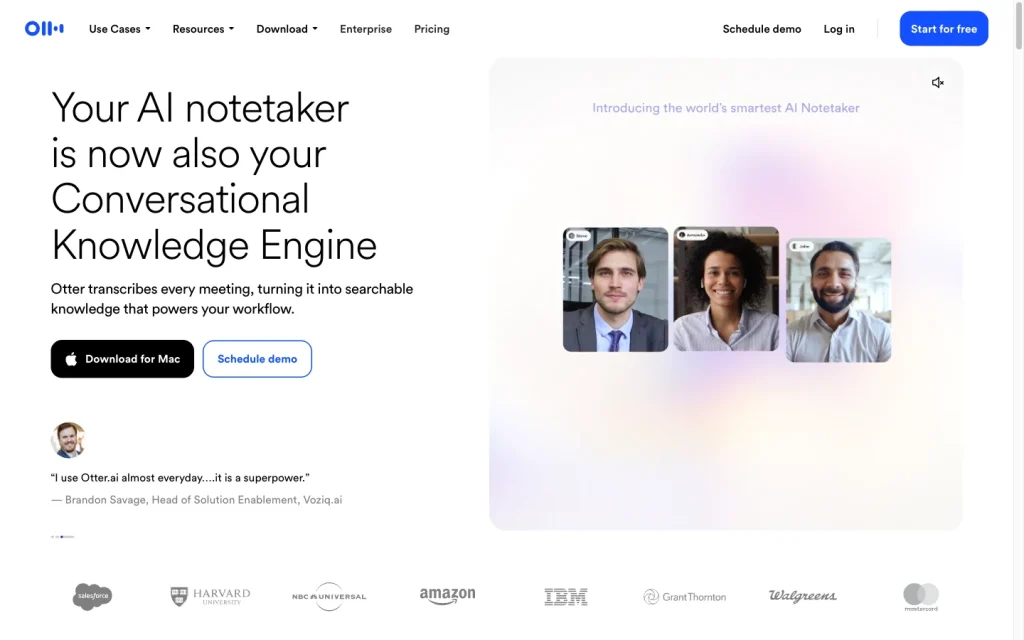
Otter.ai product image
otter.ai
On this page

Otter.ai is a capable AI meeting notes platform for teams that want to capture calls, search transcripts, and turn conversations into summaries and follow-ups. Its strongest coverage is around Zoom, Google Meet, and Microsoft Teams, with botless desktop recording and file import extending capture options. Buyers should weigh its language, platform, and plan-dependent integration limits against their meeting workflows.

What is Otter.ai?

Otter.ai is an AI meeting-notes and transcription platform for recording or importing conversations. It produces speaker-attributed transcripts, audio playback, summaries, outlines, action items, searchable meeting content, sharing features, and AI chat.

Capture and transcription

Otter Notetaker can automatically join Zoom, Google Meet, and Microsoft Teams meetings for real-time transcription. Teams can also use botless recording in the Mac and Windows desktop apps, record with web or mobile microphones, or import audio and video files. Transcription supports six languages, though one language is typically selected for each conversation.

Notes and follow-up

Each processed conversation can include an AI-generated summary, outline, and action items alongside the transcript and audio. Action items can be assigned, edited, or deleted and link back to the relevant transcript passage. Templates, channels, and AI Chat add structure and enable cross-meeting retrieval; standard summaries do not regenerate automatically after later transcript or speaker tag edits.

Workflow and integrations

The workflow runs from capture or import through transcript review, generated notes, search, collaboration, and handoff. Users can edit transcripts, add comments and highlights, share conversations or channels, and connect outputs to tools such as Jira. Enterprise workspaces add retention, SSO, admin logs, domain capture, and sharing and export controls.

Who Otter.ai fits

Otter is well suited to individuals, teams, and enterprises that want searchable meeting records and shared follow-up from recurring calls. Verify fit if meetings regularly use conferencing platforms beyond Zoom, Google Meet, and Teams, if simultaneous multilingual transcription is required, or if every meeting requires a no-bot approach.

Buyer scenarios

Where the product fits — and where to be careful

Teams that need a searchable meeting record

Need
Turn recurring meetings into searchable transcripts, shared notes, and follow-up tasks.
Why it fits
Otter combines calendar-connected capture, searchable transcripts, shared channels, templates, summaries, and action items for recurring collaborative meetings.
Watch out
Notetaker's documented bot workflow is limited to Zoom, Google Meet, and Microsoft Teams; transcription is generally one selected language per conversation.

Strong fit

Organizations needing governed meeting capture

Need
Apply administrative controls and connect meeting data to broader business workflows.
Why it fits
Enterprise adds SSO, domain capture, centralized controls, retention policies, admin logs, sharing and export restrictions, and custom integrations.
Watch out
Some integrations and connected actions are plan-dependent, require account approval, or require contacting sales.

Fit for qualifying enterprise deployments

Pros & Cons

Pros

  • Multiple capture paths: meeting bot, botless desktop recording, local recording, and file import.
  • Real-time transcription, speaker identification, playback, summaries, outlines, and action items in one workspace.
  • Six supported transcription languages and extensive business-tool connections.
  • Enterprise plans add SSO, retention, administrative logs, and sharing or export controls.

Cons

  • Notetaker's documented bot capture is limited to Zoom, Google Meet, and Microsoft Teams.
  • One language is generally selected per conversation, limiting multilingual meeting use cases.
  • Integration availability and connected actions can depend on plan, approval, or sales engagement.
  • Standard summaries do not automatically regenerate after transcript or speaker-tag edits.
Editorial score breakdown

Editorial scores

Editorial score
3.8
Access and integrations
4.0

Otter supports collaboration, transcript editing, sharing, action-item handoff, a broad integrations directory, and enterprise controls for SSO, retention, logs, sharing, and exports. Some connections and actions are plan-dependent.

Capture and transcription
4.0

Otter supports real-time Notetaker capture for Zoom, Google Meet, and Teams, plus botless desktop recording, local recording, file import, speaker identification, and six transcription languages. Platform and one-language-per-conversation limits prevent a top score.

Notes and follow-up
4.0

Otter generates summaries, outlines, and assignable action items with transcript references, and adds templates, channels, search, and AI Chat. Standard summaries do not regenerate automatically after later transcript or speaker-tag edits.

Usability, support & value
3.0

User feedback is largely positive on ease of use, while value-for-money mentions are mixed and lean negative. The available aggregate supports a mixed value assessment rather than a higher rating.

From our complete category comparison

Otter.ai alternatives

Category scores use the linked comparison rubric and can differ from a product’s overall review score.

See the full comparison
Reviewed here
Best for
Teams that want real-time meeting transcripts and collaborative, searchable notes for recurring calls.
Key tradeoff
Bot-based Notetaker capture is documented only for Zoom, Google Meet, and Microsoft Teams.
Best for
Teams that need searchable meeting records and automated follow-up across sales, recruiting, customer-facing, and operations workflows.
Key tradeoff
Bot-free capture is not available on every meeting platform.
Best for
Individuals and teams that want searchable transcripts, AI notes, and workflow handoffs from Google Meet, Zoom, or Microsoft Teams without adding a meeting bot.
Key tradeoff
Browser capture relies on active meeting captions and Chrome or Edge.
Best for
Individuals and teams that want free, high-quality recording, AI summaries, and easy-to-share meeting highlights for supported live meetings.
Key tradeoff
Bot-free capture remains phased and has platform, operating-system, and language limitations.
ProductCategory scoreBest forKey tradeoff
Otter.aiReviewed here
3.8/5Teams that want real-time meeting transcripts and collaborative, searchable notes for recurring calls.Bot-based Notetaker capture is documented only for Zoom, Google Meet, and Microsoft Teams.
Fireflies.ai
4.0/5Teams that need searchable meeting records and automated follow-up across sales, recruiting, customer-facing, and operations workflows.Bot-free capture is not available on every meeting platform.
Tactiq
3.8/5Individuals and teams that want searchable transcripts, AI notes, and workflow handoffs from Google Meet, Zoom, or Microsoft Teams without adding a meeting bot.Browser capture relies on active meeting captions and Chrome or Edge.
Fathom
4.0/5Individuals and teams that want free, high-quality recording, AI summaries, and easy-to-share meeting highlights for supported live meetings.Bot-free capture remains phased and has platform, operating-system, and language limitations.
Customer sentiment

Otter.ai customer reviews and sentiment

Based on 30 public customer reviews. Source mix: 16 from capterra.com, 8 from trustradius.com, and 6 from softwareadvice.com.

Customer sentiment is analyzed separately and does not determine the Reviews.vc editorial score.

30 public reviews analyzed
Positive
73%22 reviews
Mixed
17%5 reviews
Negative
10%3 reviews
Theme and findingMentionsPositiveNegative
Capture and transcription
Transcription is generally fast and accurate across meetings, interviews, and recordings, though users report occasional word and speaker errors, upload delays, and plan-related recording or upload limits.
19196
Notes and follow-up
Meeting summaries, written notes, follow-up emails, and shared transcripts help teams retain details and review discussions, but editing, organizing content, and tagging action items could improve.
13133
Ease of use
Users generally find the service straightforward to use and train on, including for connecting to meetings, although editing and collating recorded information can be less convenient.
981
Value for money
The tool can save substantial time on meeting notes, but unclear trial and minute pricing, per-user costs, and billing or support problems weaken its value for some buyers.
624
Integrations
Calendar and Zoom connections make meeting capture convenient, though integration-related account behavior and limits when Zoom is not connected can create friction.
441

Mentions count unique reviews. One review can count as both positive and negative for the same theme when it describes a mixed experience.

This analysis reflects public customer reviews we could identify and access at the time of collection; the displayed source mix may influence the patterns shown.

Review sentiment over time

PeriodnPositiveMixedNegative
2021 Q4Limited sample1100
2022 Q2Limited sample1100
2023 Q4Limited sample1001
2026 Q1Limited sample2110

Only periods containing dated reviews are shown; gaps between labels mean no dated reviews were available for those periods.

Pricing and contract model

Otter publishes Basic, Pro, Business, and Enterprise plans in USD. Pro and Business offer monthly and annual billing; Enterprise is quote-based.

PlanPriceIncludes
Basic
Free
Free
Free forever plan.
Pro
$16.99/user/month monthly or $8.33/user/month annually
Monthly or annual
For individuals and small teams.
Business
$30/user/month monthly or $19.99/user/month annually
Monthly or annual
For medium-sized teams; includes a seven-day trial.
  • Prices exclude applicable taxes.
  • The annual Pro option is listed as $99.99 billed yearly.

Integrations

Documented connections and access methods for Otter.ai.

Automation

Zapier Public API

Messaging & collaboration

Zoom, Google Meet, and Microsoft Teams Native
Slack Native

Developer/API

Otter API and webhooks Public API

AI protocol

MCP server Protocol

Productivity suite

Notion Native

Other

Jira Native
  • Many integrations are limited to paid plans, require a connected service, or require contacting sales.

What's new

Recent product and company updates

  • 2026-04-28

    Otter.ai evolves from AI notetaker to enterprise conversational knowledge engine

    Otter launched its Conversational Knowledge Engine with AI Chat Connectors, an expanded MCP server, rebuilt AI Chat, and Otter for Desktop.

    Source
  • 2026-07-21

    Otter.ai introduces Live Assist

    Otter introduced Live Assist, a real-time AI coaching agent for calls.

    Source

FAQ

How much does Otter.ai cost?
Basic is free. Pro is $16.99 per user per month on monthly billing or $8.33 per user per month on annual billing. Business is $30 per user per month monthly or $19.99 per user per month annually. Enterprise requires a quote.
Which meeting platforms can Otter Notetaker join?
Otter Notetaker supports Zoom, Google Meet, and Microsoft Teams. Otter also offers botless desktop recording, local recording, and audio or video file import.
Which transcription languages does Otter.ai support?
Otter supports English, Spanish, French, German, Japanese, and Simplified Chinese. One language is generally selected per conversation.
Can Otter.ai export meeting content?
Otter includes plan-dependent exports. Enterprise controls can restrict sharing and exports.
Review transparency Corrections policy
Change history
  1. 2026-10-13 Comparison Added alternatives comparison from Best AI Note Takers & Meeting Assistants.
  2. 2026-09-18 Initial publication First published version of this review.
32 sources analyzed
  1. Otter.ai Pricing otter.ai
  2. Otter.ai features help.otter.ai
  3. Supported languages help.otter.ai
  4. Otter Desktop App: Mac & Windows help.otter.ai
  5. Conversation Page Overview help.otter.ai
  6. Otter.ai Integrations otter.ai
  7. Connect Jira to Otter.ai help.otter.ai
  8. Enterprise Admin Controls Overview help.otter.ai
  9. Otter.ai evolves from AI notetaker to enterprise conversational knowledge engine otter.ai
  10. Otter.ai introduces Live Assist otter.ai

Showing 10 of 32 sources · 22 additional sources analyzed

Feedback on this article

Was this review helpful?

Private editorial feedback. It does not change product ratings or rankings.

Rate Otter.ai

Rate your experience
  • Access and integrations
  • Capture and transcription
  • Notes and follow-up
  • Usability, support & value